Von Neumann Architecture
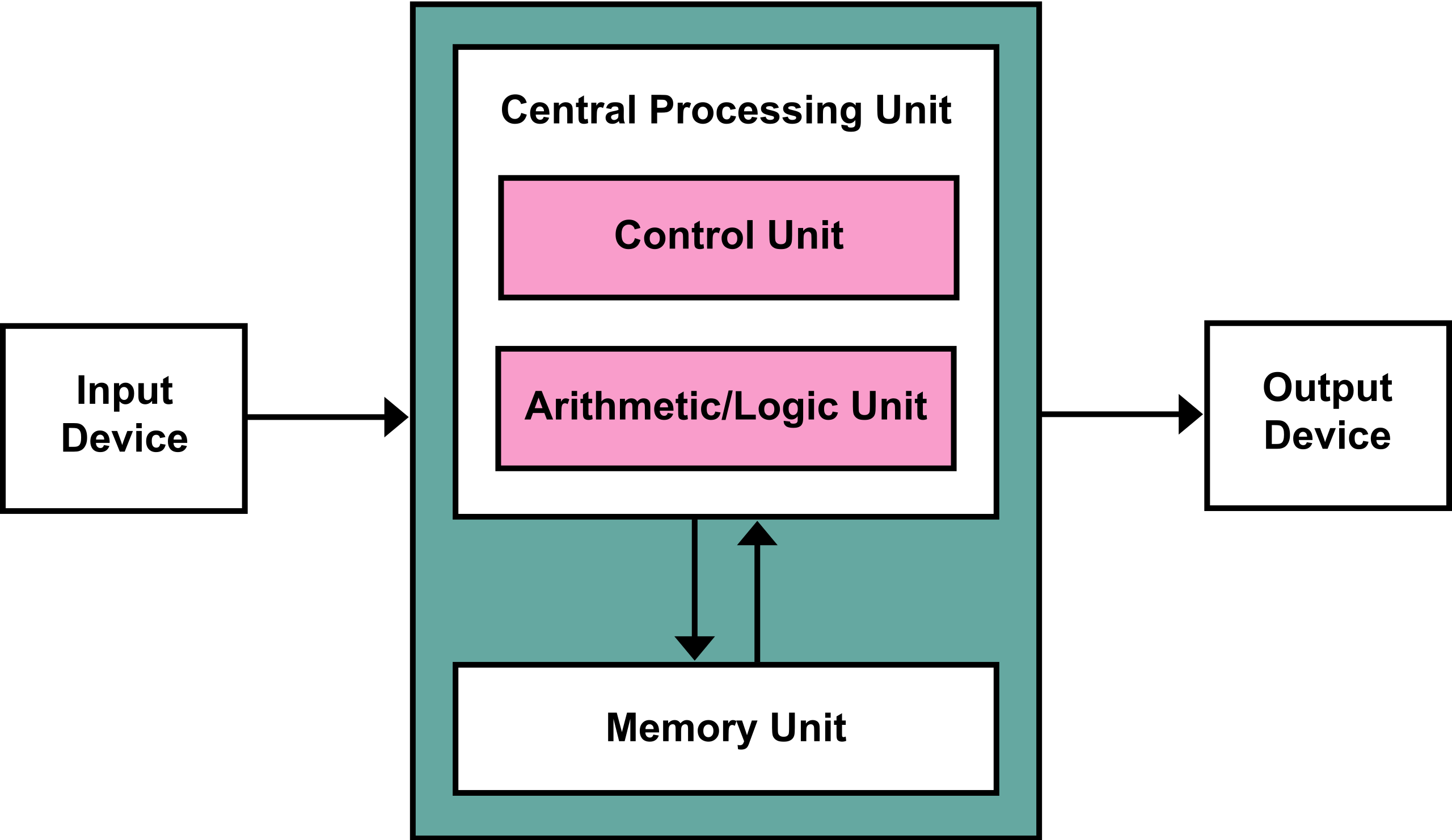
We have talked about the ALU at length and we have touched on memory, but next we will start to focus on the Control unit.
We discussed that the operations we need to carry out is mostly
Control Unit
The control unit converts binary instructions to signals and timing to direct the other components.
What signals?
We will go to the ALU again since the control unit serves it to figure out what it needs.
Remember in the ALU, has input signals that determine which calculation it will execute based on the input.
Why Timing signals?
Again, the ALU itself tells us why we need this, we saw that different calculations the ALU does take different amount of times to propagate through the circuit.
Even adding numbers of different numbers that require different number of carries can take different amount of times.
So the control unit waits an amount of time, that’s longer than the slowest calculation before sending the next instruction. It also has to wait that long before reading the output of the ALU and sending that result to memory as needed.
What is a clock?
In a computer the clock refers to a clock signal, historically this was called a logic beat. This is represented by a sinusoidal (sine wave) or square (on, off, on, off) signal that operates with a constant frequency.
This has changed a lot over time.
The first mechanical analog computer, the Z1 operated at 1 Hz, or one cycle per second; its most direct successor moved up to 5-10Hz; later there were computers at 100kHz or 100,000Hz, but where one instruction took 20 cycles, so it had an effective rate at 5kHz.
Execution Times
We will go to our clones of the course website repo:
cd fall2025/ls_data faq notes
_lab files.sh README.md
_practice genindex.md references.bib
_prepare img requirements.txt
_review index.md resources
_static LICENSE syllabus
_worksheets local.sh systools-fav.ico
activities myst.yml systools.pngHow many glossary terms are used per class session
grep term notes/*This code read each individual file, found all instances of term
We can get the computer to time it for us with time
time grep term notes/*real 0m0.015s
user 0m0.009s
sys 0m0.004sand at the bottom we see the timing results.
Three types of time
real: wall clock time, the total time that you wait for the the process to execute
user: CPU time in user mode within the the process, the time the CPU spends executing the process itself
sys: CPU time spent in the kernel within the process, the time CPU spends doing operating system interactions associated with the process
The real time includes the user time, the system time, and any scheduling or waiting time that that occurs.
We can do this a bunch of times to compare how the times vary:
time grep term notes/*real 0m0.022s
user 0m0.009s
sys 0m0.007stime grep term notes/*real 0m0.015s
user 0m0.007s
sys 0m0.007stime grep term notes/*real 0m0.016s
user 0m0.009s
sys 0m0.007stime grep term notes/*real 0m0.014s
user 0m0.009s
sys 0m0.003stime grep term notes/*real 0m0.018s
user 0m0.009s
sys 0m0.008stime grep term notes/*real 0m0.016s
user 0m0.009s
sys 0m0.006sNotice:
the
usertime is more consistent tha the othersthe
realtime that has the most external factors varies the mostthe
systime varies more thanuserand less thanreal
Solution to Exercise 2
the user time
Solution to Exercise 3
Consider closing other programs that are running on your computer, the problem is not related to your code
Solution to Exercise 4
Check for operating system related actions, for example writing and reading files.
As a quick proof of concept compare the following two actions:
time for i in {1..1000}; do echo 'hello'; done | wc -ltime for i in {1..1000}; do echo 'hello' >greet.txt; done | wc -lSee the timing example in the notes of the last class too!
In the Exercise 2 solution
Prepare for Next Class
Badges
Review the notes from today
Update your KWL chart.
If you were to use something from this course in an internship for an interview, what story could you tell?
Use
timeto compare using a bash loop to do the same operation on every file in a folder vs using the wildcard operator and sending the list of files to command. Inloop_v_list.mdinclude your code exerpts, the results and hypothesize why the faster one is faster.
Review the notes from today
Update your KWL chart.
If you were to use something from this course in an internship for an interview, what story could you tell?
Learn about the system libraries in two languages (one can be C or Python, one must be something else). Find the name(s) of the library or libraries. In systeminteraction.md summarize what types of support are shared or different? What does that tell you about the language?
In a language of your choice, use the timing library in the languge to compare two different ways of doing something to see which is faster. Choose two implementations that you think should take different times based on your understanding of how the computer executes things.
Experience Report Evidence
Questions After Today’s Class
Is it possible to turn the clock off and how badly would that damage the computer?
The CPU literally cannot function without it.
Is the clock supposed to “tick” at a constant interval? If so, how does it do it?
yes!
Currently, the typical implementation is (possibly all, but I am not super confident on that) uses a component called an Crystal oscillator. This is a physical device that naturaly produces a fixed frequency sine wave. You can read more inthe Clock rate#Engineering.
Why can’t the computer skip ahead when the add is fast?
Theoretically, it could be designed to do that, but there would need to be extra logic encoded in the device in order to catch that. This is non trivial and since the “ticks” are so fast (GHz=billions per second) we decide to save space on the board for other things (like more ALUs) or save money in prodcing it or give more unused space to dissipate heat better instead of this choice