This page includes more visual versions of the information on the grading page. You should read both, but this one is often more helpful, because some of the processes take a lot of words to explain and make more sense with a diagram for a lot of people.
Source
%matplotlib inline
import os
from datetime import date,timedelta
import calendar
import pandas as pd
import numpy as np
import seaborn as sns
# style note: when I wrote this code, it was not all one cell. I merged the cells
# for display on the course website, since Python is not the main outcome of this course
# import constants from cspt
from cspt import CourseDates
import warnings
warnings.simplefilter(action='ignore', category=FutureWarning)

course_dates = CourseDates()

meetings = course_dates.class_meeting_strings

# build a table for the dates
badge_types = ['experience', 'review', 'practice']
target_cols = ['review_target','practice_target']
df_cols = badge_types + target_cols
badge_target_df = pd.DataFrame(index=meetings, data=[['future']*len(df_cols)]*len(meetings),
                                columns=df_cols).reset_index().rename(
                                   columns={'index': 'date'})
# set relative dates
today = date.today()
start_deadline = date.today() - timedelta(7)
complete_deadline = date.today() - timedelta(14)

#  created indexing bools with casting types first, then reuse them throughout below
before_today = pd.to_datetime(badge_target_df['date']) <=pd.to_datetime(today)
before_start = pd.to_datetime(badge_target_df['date']) <=pd.to_datetime(start_deadline)
before_complete = pd.to_datetime(badge_target_df['date']) <=pd.to_datetime(complete_deadline)
before_penalty = pd.to_datetime(badge_target_df['date']) <=pd.to_datetime(course_dates.penalty_free_end)
# mark eligible experience badges
# mark targets, cascading from most recent to oldest to not have to check < and >
badge_target_df['experience'][before_today] = 'eligible'
badge_target_df['review_target'][before_today] = 'active'
badge_target_df['practice_target'][before_today] = 'active'
badge_target_df['review_target'][before_start] = 'started'
badge_target_df['practice_target'][before_start] = 'started'
badge_target_df['review_target'][before_complete] = 'completed'
badge_target_df['practice_target'][before_complete] = 'completed'
# mark enforced deadlines
badge_target_df['review'][before_today] = 'active'
badge_target_df['practice'][before_today] = 'active'
badge_target_df['review'][before_start] = 'started'
badge_target_df['practice'][before_start] = 'started'
badge_target_df['review'][before_complete] = 'completed'
badge_target_df['practice'][before_complete] = 'completed'
badge_target_df['review'][before_penalty] = 'penalty free'
badge_target_df['practice'][before_penalty] = 'penalty free'

# convert to numbers and set dates as index for heatmap compatibility
status_numbers_hm = {status:i+1 for i,status in enumerate(['future','eligible','active','penalty free','started','completed'])}
badge_target_df_hm = badge_target_df.replace(status_numbers_hm).set_index('date')

# set column names to shorter ones to fit better
badge_target_df_hm = badge_target_df_hm.rename(columns={'review':'review(e)','practice':'practice(e)',
                                                       'review_target':'review(t)','practice_target':'practice(t)',})
# build a custom color bar
n_statuses = len(status_numbers_hm.keys())
manual_palette = [sns.color_palette("pastel", 10)[7],
                 sns.color_palette("colorblind", 10)[2],
                 sns.color_palette("muted", 10)[2],
                 sns.color_palette("colorblind", 10)[9],
                 sns.color_palette("colorblind", 10)[8],
                 sns.color_palette("colorblind", 10)[3]]
# generate the figure, with the colorbar and spacing
ax = sns.heatmap(badge_target_df_hm,cmap=manual_palette,linewidths=1)
# mote titles from bottom tot op
ax.xaxis.tick_top()
# pull the colorbar object for handling
colorbar = ax.collections[0].colorbar
# fix the location fo the labels on the colorbar
r = colorbar.vmax - colorbar.vmin
colorbar.set_ticks([colorbar.vmin + r / n_statuses * (0.5 + i) for i in range(n_statuses)])
colorbar.set_ticklabels(list(status_numbers_hm.keys()))
# add a title
today_string = today.isoformat()
ax.set_title('Badge Status as of '+ today_string);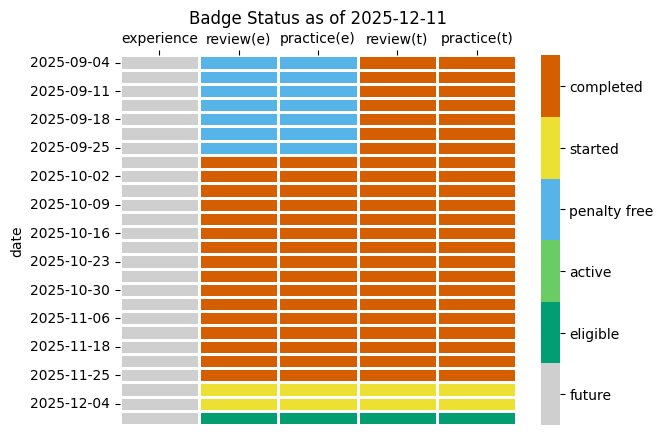
Getting Feedback
Who should you request/assign?
course item type | issue asignee | PR reviewer |
prepare work | assignment not required; can be student | none requierd; merge to experience branch |
experience badge | N/A | TA asigned to your group (will be automatic after a few classes) |
practice badge | assignment not required; can be student |
|
review badge | assignment not required; can be student |
|
explore badge | proposal, assigned to |
|
build badge | proposal, assigned to |
|
anything merged pre-emptively in penalty free | N/A |
|
Deadlines
We do not have a final exam, but URI assigns an exam time for every class. The date of that assigned exam will be the final due date for all work including all revisions.
experience, review, and practice badges have general deadlines. Explore and build deadlines are based on when you propose and you can propose your own.
Experience badges
Prepare work tasks must be done before class so that you are prepared. Missing a prepare task could require you to do an experience report to make up what you were not able to do in class.
If you miss class, the experience report should be at least attempted/drafted (though you may not get feedback/confirmation) before the next class that you attend. This is strict, not as punishment, but to ensure that you are able to participate in the next class that you attend. Skipping the experience report for a missed class, may result in needing to do an experience report for the next class you attend to make up what you were not able to complete due to the missing class activities.
If you miss multiple classes, create a catch-up plan to get back on track by contacting instructor either with an issue or email.
Review and Practice Badges
These badges have 5 stages:
posted: tasks are on the course website(review and practice) and an issue is created
started: one task is attempted and a draft PR is open
completed: all tasks are attempted PR is ready for review, and a review is requested
earned: PR is approved (by instructor or a TA) and work is merged
These badges badges must be started within one week of when they are posted and completed within two weeks. A task is attempted when you have answered the questions or submitted evidence of doing an activity or asked a sincere clarifying question.
If a badge is planned, but not started within one week it will become expired and ineligble to be earned. You may request extensions to complete a badge by updating the PR message, these will typically be granted. Extensions for starting badges will only be granted in exceptional circumstances.
Expired badges will receive a comment and be closed
Once you have a good-faith attempt at a complete badge, you have until the end of the semester to finish the revisions in order to earn the badge.
Explore Badges
Explore badges are feedback-limited. You will not get feedback on subsequent explore badge proposals until you earn the first one.
Explore badges have 5 stages:
proposed: issue created
in progress: issue is labeled “proceed” by the instructor
complete: work is complete, PR created, review requested
revision: “request changes” review was given
earned: PR approved
Once you have one earned, then you can have up to two in progress and two in revision at any given time. At most, you will receive feedback for one explore badge per week, so in order to earn six, your first one must start your first one early enough.
Build Badges
At most one build badge will be evaluated every 4 weeks. This means that if you want to earn 3 build badges, the first one must be in 8 weeks before the end of the semester.
Procedures
Prepare work and Experience Badges Process
This is for a single example with specific dates, but it is similar for all future dates
The columns (and purple boxes) correspond to branches in your KWL repo and the yellow boxes are the things that you have to do. The “critical” box is what you have to wait for us on. The arrows represent PRs (or a local merge for the first one)
In the end the commit sequence for this will look like the following:
You can merge the prepare into the experience with a PR or on the command line, your choice.
Where the “approved” tag represents and approving reivew on the PR.
You can, once you know how, do this offline and do the merge with in the CLI instead of with a PR.
Review and Practice Badge
Legend:
This is the general process for review and practice badges
Explore Badges
Build Badges
Community Badges
You can log them either manually or with help of an action that a past student contributed! It always ends up with a PR that must be reviewed by @brownsarahm
Logger Action
Your KWL repo has an action called “Community & Explore Badge Logger” that will help you.
Find that on the left hand list on the Actions tab of your repository.
Manual logging
These are the instructions from your community_contributions.md file in your KWL repo:
For each one:
In the `community_contributions.md`` file on your kwl repo, add an item in a bulleted list (start the line with - )
Include a link to your contribution like
[text to display](url/of/contribution)create an individual pull request titled “Community-shortname” where
shortnameis a short name for what you did. approval on this PR by instructor will constitute credit for your graderequest a review on that PR from
@brownsarahm