Prelude
What do we mean by representation?
Computers are electrical devices, there are circuits that calculate everything, using gates that represent logical operations.
In order to get the data (the thigns we want to compute) through the ciruits we have to represent the values somehow.
We discussed previously how we could represent success/failure with 0/1.
You may have seen ASCII codes before: those are numbers to represent each character, that is how characters are represented in a computer.
Sometimes, we mix representations within a single bit string:
object instructions could use the first few bits to represent the operation and the rest to represent a value (so we can encode an instruction in a single register)
negative numbers
negative numbers
we use one bit to represent the sign. and then e have two choices for the rest of the bits:
representation | how to negate | how to read |
ones complement | flip all the bits | note the sign, flip all the bits back |
two’s complement | flip the bits, add 1 | note the sign, flip all the bits, add one |
Try it out on integer exposed
For example, set it to 3 and then use the ~ button to flip the bits and add one by flipping the 0 in the ones place to a 1 (add one), that ends up at -3
so in 8 bit signed integer 3 is 00000011 and -3 is 11111101.
Try a few other cases in integer exposed
Two’s complement is the most common
What about a fixed point for fractions?
Let’s experiment with an 8 bit representation with 1 bit for sign and then the next 4 used for the part of the number greater than 0 and the last 3 for the fractional part.
With that rule, what does the following represent?
01000001would be
0-1000-001positive, 8.1
How many total numbers can we represent?
in this then we can represent the numbers 0-8 for the right hand side and 0-15 on the left hand side so we get
When the numbers are small it is important for their neighbors to be close together, when numbers are bigger it is more likely to be okay if the neighbors are farther apart.
we can visualize values with memory spy
We can visualize this in code using a little Python if we want:
import itertools
num_list = [str(n+f) for n,f in itertools.product(range(16),[i/10 for i in range(10)])]
', '.join(num_list) + ', '.join(['-'+ n for n in num_list])len(num_list)*2(2**7)*2Another way we could represent numbers with a fixed point, is to use base two fractions: , , etc.
In this fixed point we would have, for example:
0101.1010 would be
In this case we still have a small range of numbers, but it’s a different set of possible numbers.
Floating Point Notation
We can write numbers in many different forms. We have written integers through many different bases so far.
For example in scientific contexts, we often write numbers (in base 10) like:
We can use a similiar form to represent numbers in binary. Using base 2 instead of base 10.
Floating point numbers are not all exact
Let’s look at an example, we add .1 together 3 times, and we get the expected result.
.1 + .1 + .10.30000000000000004However, if we check what it’s equal to, it does not equal .3
.1 + .1 + .1 == .3FalseThis is because the floating point representation is an approximation and there are multiple full numbers that are close to any given number that cannot be expressed exactly.
However, the display truncates since usually we want only a few significant digits.
Even rounding does not make it work.
round(.1,1) + round(.1,1) + round(.1,1) == round(.3,1)FalseInstead, we use subtraction and a tolerance:
(.1+.1+.1 - .3)< .0001TrueFloating point IEEE standard
Now, lets see how these numbers are actually represented.
IEEE Floating Point is what basically everyone uses, but it is technically a choice hardware manufacturers can make.
Initially in 1985
Reviesd in 2008 after 7 year process that expanded
revised in 2019 after 4 year process that mostly added clarifications
Next revision is projected to 2028.
this is a double precision float or binary64 inthe current standard.
it was called double in the original, offically, so it is commonly called that still, even though it is no longer the formally correct name.
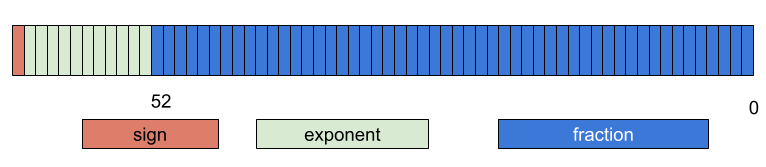
Figure 1:color-coded bits illustrating that IEEE floating point uses 1 bit for sign ( the left most) then 11 bits (next, to the right of the sign bit), and the rightmost 52 bits are the fraction or significand bits
where:
is the sign bit is
is the number represented by the exponent bits is and
the 52 bits of the fraction are numbered from right to left (the rightmost is and the leftmost is ).
means we are working with fractions instead of integers in the sum.
means the sum for
In this case we will 1 bit for sign, 11 for exponent and 52 for the fraction part
Note that this is so we are working with fractions instead of integers in the sum.
So, for example:
0 01111111111 0000000000000000000000000000000000000000000000000000we can follow the equation to get:
and for
0 01111111111 0100000000000000000000000000000000000000000000000000following the equation, we get:
Why use e-1023 for the exponent?
2**112048so 1023 is half -1, this means that we split the possible range of numbers that we can represent in the exponent to positive and negative, meaning the whole expression ranges from large(21025) to small(2-1023)
How do we get numbers into this form?
Now, let’s return to our example of .1.
First we take the sign of the number for the sign bit, but then to get the exponent and fraction, we have more work to do.
Let’s take the equation we had from the standard:
If we think about the fraction and how we add fractions, by reaching a common denominator. Since they’re all powers of two, we can use the last one.
and we can expand the sum to a different notation for visual clarity
And apply a common denominator:
So then this becomes a binary number with 53 bits (the 52 + 1) and a denominator of 252, let’s call that number so we have:.
we can then combine the powers of 2.
So in order to return to our .1 that we want to represent, we can represent it as a fraction and then approximated it in the form above.
means approximately equal to
after some manipulation:
Since we want to use exactly 53 bits to represent , we want to be greater than or equal to 252 and less than 253.
Since we can say
and we can also say that
(larger denominators is smaller numbers if the numerators are the same)
We can put any numerator that is the same across all :
and simplify the outer ones to only have a single exponent
so if we want:
then best is 56,.
We can confirm this in a calculator
2**52 <= 2**56/10 < 2**53TrueNow we can get the number we will use for . We want to get as close to .1 with our fraction as possible, so we get the quotient and remainder, the quotient will be the number we use, but we use the remainder to see if we round up or not
q,r =divmod(2**56,10)Then we check the remainder to decide if we should round up by 1 or not.
r6J = q+1so we round up
then we can check the length in bits of that number
First we look, then we see that there are two extra characters at the left: 0b
bin(J)'0b11001100110011001100110011001100110011001100110011010'then check the length
len(bin(J))-253We need so to solve for
52-56+10231019e = 52-56+1023Now lets’ confirm what we found with the actual representation:
Python doesn’t provide a binary reprsentation of floats, but it does provide a hex representation.
float.hex(.1)'0x1.999999999999ap-4'THat matches this for the part before the p.
0b1 1001 1001 1001 1001 1001 1001 1001 1001 1001 1001 1001 1001 1010
after the p is the exponent of . Which matches the approximation we found.
We can also test by computing
J/2**56 ==.1TruePrepare for Next Class
Think about what you know about how computer execute code to prepare for class
Badges
Review the notes from today
Write a C program to compare values as doubles and as float (single precision/32bit) to see that the issue we saw with .1 is related to the IEEE standard and is not language specific. Make notes and comparison around its behavior and include the program in a code cell in cdouble.md
Review the notes from today
Write a C program to compare values as doubles and as float (single precision/32bit) to see that this comparison issue is related to the IEEE standard and is not language specific. Make notes and comparison around its behavior and include the program in a code cell in cdouble.md
In floatexpt.md design an experiment using the
fractions.Fractionclass in Python that helps illustrate why.1*3 == .3evaluates toFalsebut.1*4 ==.4evaluates toTrue. Your file must include both code and interpretation of the results.
Experience Report Evidence
Questions After Today’s Class
Are there any other types like these that the computer uses?
Integer and float are the two main ways to represent numbers, but there are lots of other things that get represented. We will see a few more in the next few classes.
If you use a float number greater than .1 when adding, is the approxamation even less exact since the number is larger?
Not strictly, for example, as we saw, we can represent .25 exactly. We can represent anything that is a power of two (positive or negative power), a multiple of powers of 2, or sums of powers of 2 exactly, it’s just values in between that we have to approximate.
Since its notexact numbers how does this affect us. Will this ever likley ever be used?
It changes the precision of all calculations.
You won’t have to do it by hand, but it is important to know that the values are imprecise.
Seeing how this is designed might help you think through other representation or represent novel things that you need to store.
Where can I see different options for explore badges or do I have to make ideas for myself, are they similar to normal review or practice badges?
There are some ideas on the explore page. There are some in a few practice badges we have and and that are coming up.
There are also a few classes where students’ questions are good explore topics.
Do “exact” floating-point values, like 0.5 (or 1/2), also get represented as approximations?
No, those ones we use the formula, but they come out exact.
how long did it take the engineers that developed even the more basic computers to impliment these mathematics into their devices?
This is a good explore badge topic