Defining terms
A commit is the most important unit of git. Later we will talk about what git as a whole is in more detail, but understanding a commit is essential to understanding how to fix things using git.
In CS we often have multiple, overlapping definitions for a term depending on our goal.
In intro classes, we try really hard to only use one definition for each term to let you focus.
Now we need to contend with multiple definitions
These definitons could be based on
what it conceptually represents
its role in a larger system
what its parts are
how it is implemented
for a commit, today, we are going to go through all of these, with lighter treatment on the implementation for today, and more detail later.
Conceptually, a commit is a snapshot
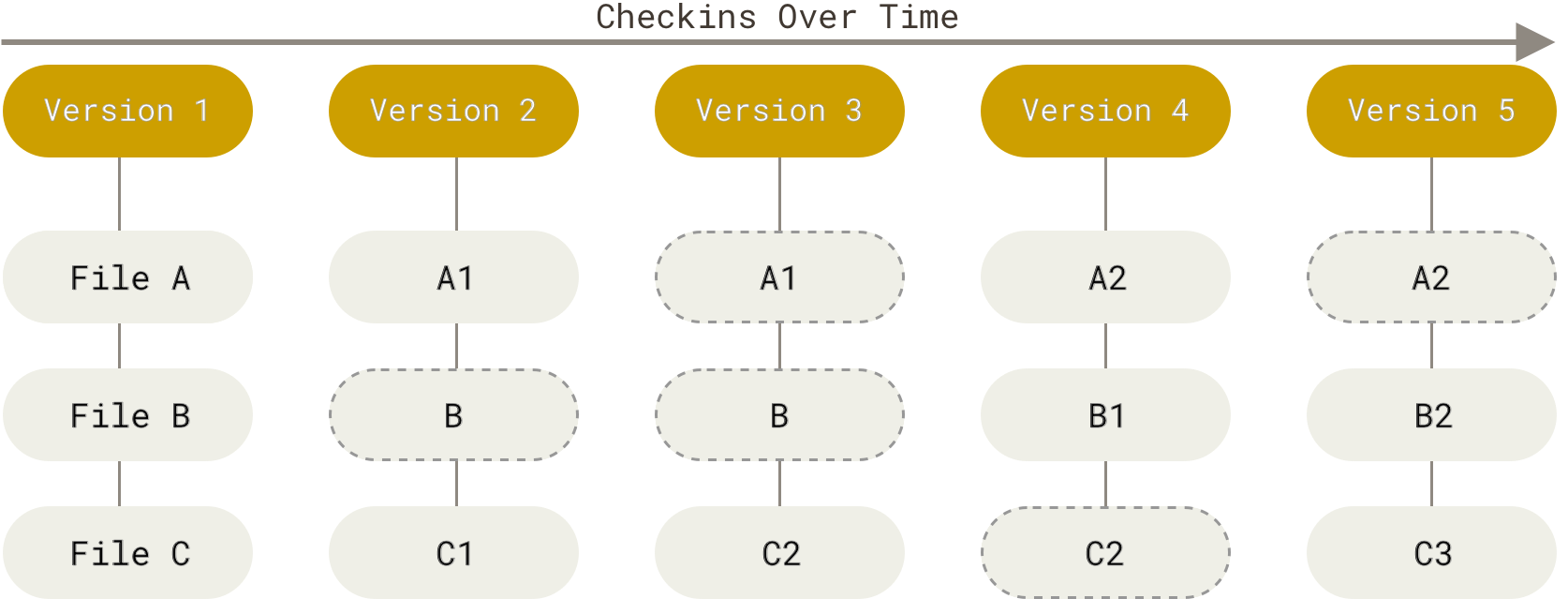
Figure 1:git takes a full snapshot of the repo at each commit.
Under the hood, it only makes an additional copy of files that have changed because it uses the same technique to store each snapshot, so any files that have not changed, do not create new files inside of git.
A commit’s role is central to git
a commit is the basic unit of what git manages
All other git things are defined relative to commits
branches are pointers to commits that move
tags are pointers to commits that do not move
trees are how file path/organization information is stored for a commit
blobs are how files contents are stored when a commit is made
Parts of a commit
We will learn about the structure of a commit by inspecting it.
First we will go back to our gh-inclass repo
cd Documents/inclass/systems/gh-inclass-fa25-brownsarahm/From git log
We can use git log to view past commits
git log1 2 3 4 5 6 7 8 9 10 11 12 13 14 15 16 17 18 19 20 21commit e899a0e7ad5a9626a6d5c6b0fd96a410bd42b710 (HEAD -> organization) Author: Sarah M Brown <brownsarahm@uri.edu> Date: Thu Sep 18 13:38:47 2025 -0400 begin reorg commit 285dd2104498d173d1926fb59f5513d224a34a14 Author: Sarah M Brown <brownsarahm@uri.edu> Date: Thu Sep 18 13:04:26 2025 -0400 add note to readme commit 3300996de3e91ced5c731d759d29a10f011aeb00 (origin/organizing_ac, organizing_ac) Author: Sarah M Brown <brownsarahm@uri.edu> Date: Thu Sep 18 12:34:06 2025 -0400 add files for organizing activity commit 11017a59088d4a0b880f770f15fab8c9e086a789 (origin/main, origin/HEAD, mybranchcheckedoutb, my_branch, main) Merge: c8f4926 99f86bf Author: Sarah Brown <brownsarahm@uri.edu>
1 2 3 4 5 6 7 8 9 10 11 12 13 14 15 16 17 18 19 20 21commit e899a0e7ad5a9626a6d5c6b0fd96a410bd42b710 (HEAD -> organization) Author: Sarah M Brown <brownsarahm@uri.edu> Date: Thu Sep 18 13:38:47 2025 -0400 begin reorg commit 285dd2104498d173d1926fb59f5513d224a34a14 Author: Sarah M Brown <brownsarahm@uri.edu> Date: Thu Sep 18 13:04:26 2025 -0400 add note to readme commit 3300996de3e91ced5c731d759d29a10f011aeb00 (origin/organizing_ac, organizing_ac) Author: Sarah M Brown <brownsarahm@uri.edu> Date: Thu Sep 18 12:34:06 2025 -0400 add files for organizing activity commit 11017a59088d4a0b880f770f15fab8c9e086a789 (origin/main, origin/HEAD, mybranchcheckedoutb, my_branch, main) Merge: c8f4926 99f86bf Author: Sarah Brown <brownsarahm@uri.edu>
This shows several commits, but let’s take one for closer inspection, the tabs show highlighted the most recent two commits, each chunk is a distinct commit.
Let’s examine one commit in more detail.
1 2 3 4 5commit e899a0e7ad5a9626a6d5c6b0fd96a410bd42b710 Author: Sarah M Brown <brownsarahm@uri.edu> Date: Thu Sep 18 13:38:47 2025 -0400 begin reorg
the hash is the unique identifier for the commit and the name of the file the commit is stored in in the object database (.git)
1 2 3 4 5commit e899a0e7ad5a9626a6d5c6b0fd96a410bd42b710 Author: Sarah M Brown <brownsarahm@uri.edu> Date: Thu Sep 18 13:38:47 2025 -0400 begin reorg
The author information generally has the display name and email address, these are set per system generally, but optionally per repository with git config
1 2 3 4 5commit e899a0e7ad5a9626a6d5c6b0fd96a410bd42b710 Author: Sarah M Brown <brownsarahm@uri.edu> Date: Thu Sep 18 13:38:47 2025 -0400 begin reorg
the time stamp shows the time the commit was made, including the time zone
1 2 3 4 5commit e899a0e7ad5a9626a6d5c6b0fd96a410bd42b710 Author: Sarah M Brown <brownsarahm@uri.edu> Date: Thu Sep 18 13:38:47 2025 -0400 begin reorg
the message is written for people to know what the contents of the commit is in human understandable terms.
but we know commits are supposed to represent some content and we have no information about that in this view
Seeing the full commit content
we can view individual commits with git cat-file and at least 4
characters of the hash or enough to be unique. We will try 4 characters
and I will use the commit we inspected above, with full hash e899a0e7ad5a9626a6d5c6b0fd96a410bd42b710
git cat-file has different modes and one must be specified for it to work:
-pfor pretty print-tto return the type
We’ll use -p here:
git cat-file -p e899tree 6f435051d686c4fec112cdfe7c73c65ad9153125
parent 285dd2104498d173d1926fb59f5513d224a34a14
author Sarah M Brown <brownsarahm@uri.edu> 1758217127 -0400
committer Sarah M Brown <brownsarahm@uri.edu> 1758217127 -0400
begin reorgNow we see more detail,
This view doesn’t show the hash of the commit anymore, only the contents of the commit itselv
1 2 3 4 5 6tree 6f435051d686c4fec112cdfe7c73c65ad9153125 parent 285dd2104498d173d1926fb59f5513d224a34a14 author Sarah M Brown <brownsarahm@uri.edu> 1758217127 -0400 committer Sarah M Brown <brownsarahm@uri.edu> 1758217127 -0400 begin reorg
1 2 3 4 5 6tree 6f435051d686c4fec112cdfe7c73c65ad9153125 parent 285dd2104498d173d1926fb59f5513d224a34a14 author Sarah M Brown <brownsarahm@uri.edu> 1758217127 -0400 committer Sarah M Brown <brownsarahm@uri.edu> 1758217127 -0400 begin reorg
Every commit knows what commit came before it, this is the hash of the previous commit, recall from the output of git log
1 2 3 4 5 6tree 6f435051d686c4fec112cdfe7c73c65ad9153125 parent 285dd2104498d173d1926fb59f5513d224a34a14 author Sarah M Brown <brownsarahm@uri.edu> 1758217127 -0400 committer Sarah M Brown <brownsarahm@uri.edu> 1758217127 -0400 begin reorg
The author is the person who wrote the content being committed, the intellectual author of the work[1] the time stamp shows the time the commit was made, including the time zone, here it is shown as stored in raw form[2].
1 2 3 4 5 6tree 6f435051d686c4fec112cdfe7c73c65ad9153125 parent 285dd2104498d173d1926fb59f5513d224a34a14 author Sarah M Brown <brownsarahm@uri.edu> 1758217127 -0400 committer Sarah M Brown <brownsarahm@uri.edu> 1758217127 -0400 begin reorg
the committer is the person who made the commit[1] the time stamp shows the time the commit was made, including the time zone, here it is shown as stored in raw form[2].
1 2 3 4 5 6tree 6f435051d686c4fec112cdfe7c73c65ad9153125 parent 285dd2104498d173d1926fb59f5513d224a34a14 author Sarah M Brown <brownsarahm@uri.edu> 1758217127 -0400 committer Sarah M Brown <brownsarahm@uri.edu> 1758217127 -0400 begin reorg
the message is written for people to know what the contents of the commit is in human understandable terms.
The commiter and author are generally the same, a common time when they are different is merge commits.
For example this commit from courseutils
tree 334b6685f652af4236afd3310d44881c6f0159a3
parent 522f11e939ae38d7081d1e9a1a1aa4b9a93ea4d2
parent d833ad8e4b41756e17a42c9537c04cb7fa8da3a9
author Sarah Brown <brownsarahm@uri.edu> 1737644878 -0500
committer GitHub <noreply@github.com> 1737644878 -0500Trees are object too
So we can look at them the same way
git cat-file -p 6f43040000 tree 263fb9d22090e88edd2bf1847c24c3511de91b49 .github
100644 blob c1b4f81358eaaf467ff4ce4b95171497c28d1622 .gitignore
100644 blob 3a4533a3abbc749f5e1905b30eb187a7350ae71a API.md
100644 blob 9ece5efa25710c8fad7d9f210928785b5362b06f CONTRIBUTING.md
100644 blob 2d232a2231c650dc4094606797fe0bd3e0ce4c65 LICENSE.md
100644 blob 19e9a4e91197294600869263508df42d46328d5c README.md
100644 blob 9d6ffa6ded47d8b6df13ed60e482b188015ee499 abstract_base_class.py
100644 blob 762f01b5cf84f39096d55ca95e46f0519d8cae48 alternative_classes.py
040000 tree 743db376fa76bb3611cfac6935938d179330c7eb docs
100644 blob 93c08483f44ebdf5ce10e6c0002e641aa0cc8844 example.md
100644 blob f9e70e5b8173525188a6b10ce5979972de4e0d9f helper_functions.py
100644 blob 762f01b5cf84f39096d55ca95e46f0519d8cae48 important_classes.py
100644 blob d87bf4a5641e0429fd3c371bd2b19d755105ca92 scratch.ipynb
100644 blob 39d5708913a6c708d1a505cde6da544785c086a6 setup.py
040000 tree d3980efccf4856f0c61a6a16ed40be534c5230a5 teststhe tree contains pointers to more objects: other trees and blob objects that contain the file conten
Blobs hold the content of a file
and we can look at them too
git cat-file -p c1b4.secretsince I am tracing the tree of my own most recent commit, and i have not changed anything since
git statusOn branch organization
nothing to commit, working tree cleanthe file contents should match
cat .gitignore.secretand it does!
Commits are implemented as files
commits are stored in the .git directory as files. git itself is a file system, or a way of storing information.
Everything the git program uses is stored in the .git directory, you can think of that like all of the variables the program would need if it ran all the time.
ls .gitCOMMIT_EDITMSG FETCH_HEAD index objects REBASE_HEAD
config HEAD info ORIG_HEAD refs
description hooks logs packed-refsMost of the content is in the objects folder, git objects are the items that get stores.
ls .git/objects/0b 1f 37 49 76 9e bc d3 e8
11 21 39 4f 82 a4 c1 d6 f9
18 28 3a 63 93 ab c4 d8 info
19 2d 3c 6f 99 b0 cc da pack
1e 33 48 74 9d b6 ce e0We see a lot more folders here than we had commits. This is because there are multiple types of objects that all create entries in this object database
There are 3 main types:
Each of those folders is the first 2 digits of at least one hash, or unique identifier for an object. We can list what is in one of those folders
ls .git/objects/c1b4f81358eaaf467ff4ce4b95171497c28d1622Mine has just one, most will in a small repo like this, but it could be mroe than one.
We can look at the plain file using cat
cat .git/objects/c1/b4f81358eaaf467ff4ce4b95171497c28d1622xK??OR?`?+NM.J-?&K?The content of the file is stored in compressed form, not human readable.
the git cat-file git git plumbing command can parse the file though so we can read it.
git cat-file -p c1b4.secretThe same is true for commit objects:
cat .git/objects/e8/99a0e7ad5a9626a6d5c6b0fd96a410bd42b710x??A
?0=??%??&-??wO? ?n??Jl??Z??i```?2M?
??a???wl%4!?????9?8I???<S??,Bh?o?[
p?[]?3????M?'???!?H??[k?or??s?i??Pu???V?G?still not readable
we can also check the type of objects
git cat-file -t c1b4blobgit cat-file -t e899commitboth as expected
Losing stuff in git is hard
Imagine you had several commits including some on a new branch
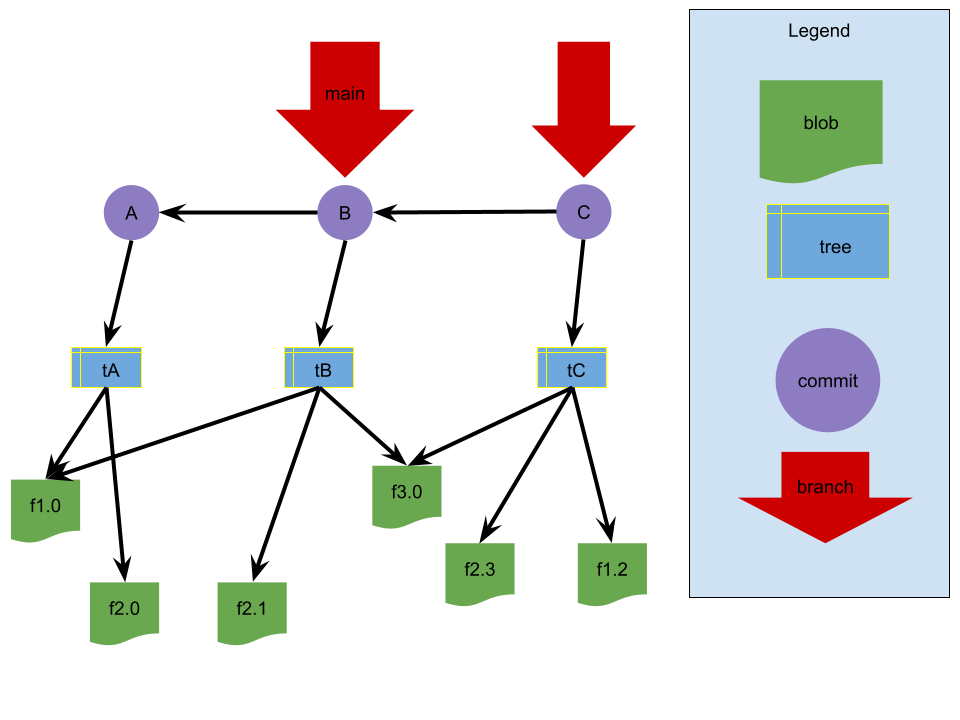
Figure 2:in this example we have 3 commits: A, B, C and each has a tree and there are some blob objects. The arrows are the things we can trace through, where there are pointers from one object to another.
Now conisder that you switched back to the main branch and then deleted the new branch without merging those commits.
git checkout main
git branch -d new
so our situation is like this
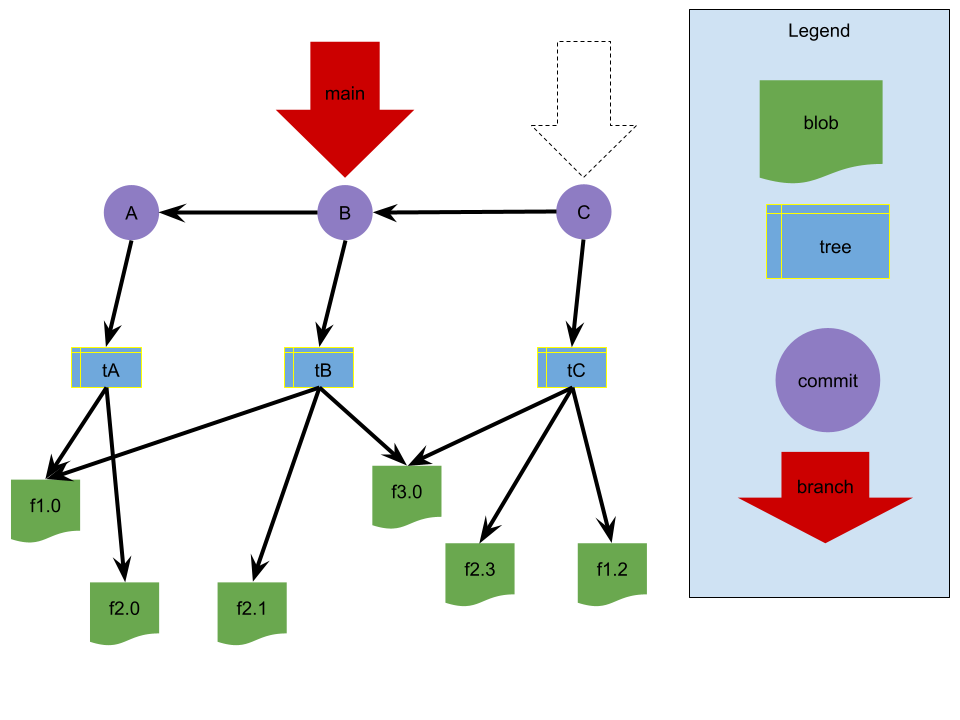
Figure 3:now the new branch is deleted
Normally when we get a branch with git checkout the following happens:
changing the head pointer to point to that branch
going to the commit the branch points to
reading the tree in the commit
for each blob/tree in the that tree, create the file based on the name in the tree and the conent in the blob
Now we have no way to access commit C or the chances to files f1 and f2, because we have no pointer to it. The contente is still there though!
We could recover it manually by:
logging the current commit hash (B)
goign to its tree and logging the hash for tB
going to the blob objects from that tree and logging each of those (f3.0, f2.1, f1.0)
going the commit before commit (from B to A)
logging the hash of that commit (A)
goign to its tree and logging the hash for tA
going to the blob objects from that tree and logging each of those (f2.0, f1.0)
making a list of all of the hashes from
.git/objectsfinding which hashes are there but on on our list so far (C,tC, f2.3, f1.2)
checking each of those for which is a commit
setting a branch
new_fixedto that hash (C)
Tracing the commit history
We can trace in a real repo by first looking at the HEAD pointer
cat .git/HEADref: refs/heads/organizationthat points to the branch, which is a file so we can look at that too
cat .git/refs/heads/organizatione899a0e7ad5a9626a6d5c6b0fd96a410bd42b710then we look at that commit
git cat-file -p e8991 2 3 4 5 6tree 6f435051d686c4fec112cdfe7c73c65ad9153125 parent 285dd2104498d173d1926fb59f5513d224a34a14 author Sarah M Brown <brownsarahm@uri.edu> 1758217127 -0400 committer Sarah M Brown <brownsarahm@uri.edu> 1758217127 -0400 begin reorg
then its parent
git cat-file -p 285dd1 2 3 4 5 6tree c429050b554c3d504dc964b32f59affcf28f6435 parent 3300996de3e91ced5c731d759d29a10f011aeb00 author Sarah M Brown <brownsarahm@uri.edu> 1758215066 -0400 committer Sarah M Brown <brownsarahm@uri.edu> 1758215066 -0400 add note to readme
and we could continue back
Commit messages are essential
A git commit message must exist and is always for people, but can also be for machines.
the conventional commits standard is a format of commits
if you use this, then you can use automated tools to generate a full change log when you release code
A tip in code spaces
Codespaces are a virutal machine that you can use VSCode on in browser. You only have VSCode access to this system, but VSCode with the terminal is a lot of power.
first check the status
git statusOn branch organization
nothing to commit, working tree cleanbut it’s not pushed so we do that
git pushfatal: The current branch organization has no upstream branch.
To push the current branch and set the remote as upstream, use
git push --set-upstream origin organization
To have this happen automatically for branches without a tracking
upstream, see 'push.autoSetupRemote' in 'git help config'.so we do what git suggests
git push --set-upstream origin organizationEnumerating objects: 11, done.
Counting objects: 100% (11/11), done.
Delta compression using up to 16 threads
Compressing objects: 100% (7/7), done.
Writing objects: 100% (9/9), 1.36 KiB | 1.36 MiB/s, done.
Total 9 (delta 2), reused 0 (delta 0), pack-reused 0 (from 0)
remote: Resolving deltas: 100% (2/2), completed with 1 local object.
remote:
remote: Create a pull request for 'organization' on GitHub by visiting:
remote: https://github.com/compsys-progtools/gh-inclass-fa25-brownsarahm/pull/new/organization
remote:
To https://github.com/compsys-progtools/gh-inclass-fa25-brownsarahm.git
* [new branch] organization -> organization
branch 'organization' set up to track 'origin/organization'.Then move to browser
gh repo view --webOpening https://github.com/compsys-progtools/gh-inclass-fa25-brownsarahm in your browser.Navigate to your github inclass repo on Github.com
Use the link in the README or the green code button to open a new codespace on main.
when your codespace is open, share its name (first part of the url 2 words)
If VSCode is new to you, use their documentation of the VSCode interface to get oriented to the different parts of the screen.
Prepare for Next Class
review the notes from the last class and make sure you understand. Bring any questions that come up for you or post them as issues on the course website.
Think through and make some notes about what you have learned about design (software or otherwise) so far. Try to answer the questions below in
design_before.md. If you do not now know how to answer any of the questions, write in what questions you have.
- What past experiences with making decisions about design of software do you have?
- what experiences studying design do you have?
- What processes, decisions, and practices come to mind when you think about designing software?
- From your experiences as a user, how you would describe the design of command line tools vs other GUI based tools?Badges
Export your git log for your KWL main branch to a file called gitlog.txt and commit that as exported to the branch for this issue. note that you will need to work between two branchse to make this happen. Append a blank line,
## Commands, and another blank line to the file, then the command history used for this exercise to the end of the file.In commit-def.md compare two of the four ways we described a commit today in class. How do the two descriptions differ? How does defining it in different ways help add up to improve your understanding?
Find the detailed view of the commit that added today’s notes to the website in github.com and locally. In
commit-detail.mdinclude the url to the commit in github and the contents of the commit object with some notes on any differences (if any).
Explore the tools for conventional commits and then pick one to try out. Work on the branch for this badge and use one of the tools that helps making conventional commits (eg in VSCode or a CLI for it)for a series of commits adding “features” and “bug fixes” telling the story of a code project in a file called commit-story.md. For each edit, add short phrases like ‘new feature 1’, or ‘next bug fix’ to the
commit-story.mdeach time, but use conventional commits for each commit. In total, make at least 5 different types of changes (types per conventional commits standard) including 2 breaking changes and at least 10 total commits to the file.learn about options for how git can display commit history. Try out a few different options. Choose two, write them both to a file, gitlog-compare.md. Using a text editor, wrap each log with three backticks to make them “code blocks” and then add text to the file describing a use case where that format in particular would be helpful. do this after the above so that your git log examples include your conventional commits
Find the detailed view of the commit that added today’s notes to the website in github.com and locally. In
commit-detail-compare.mdinclude the url to the commit in github and the contents of the commit object with a description (pseudocode or bullets) of what Github would have to do to create its detailed view page from the commit object.
Experience Report Evidence
redirect your history to a file log-2024-02-08.txt and include it with your experience report.
Questions After Today’s Class
What are gonna be our applications of tracing hashes?
This was mostly a learning experience, having this understanding makes the more complex git commands make sense. You generally will not do it yourself, unless you were contributing to git.
I think it’s easier to remember long term that this is how git works if you hve actually gone through it than just seeing for example a slide saying thats what it does.
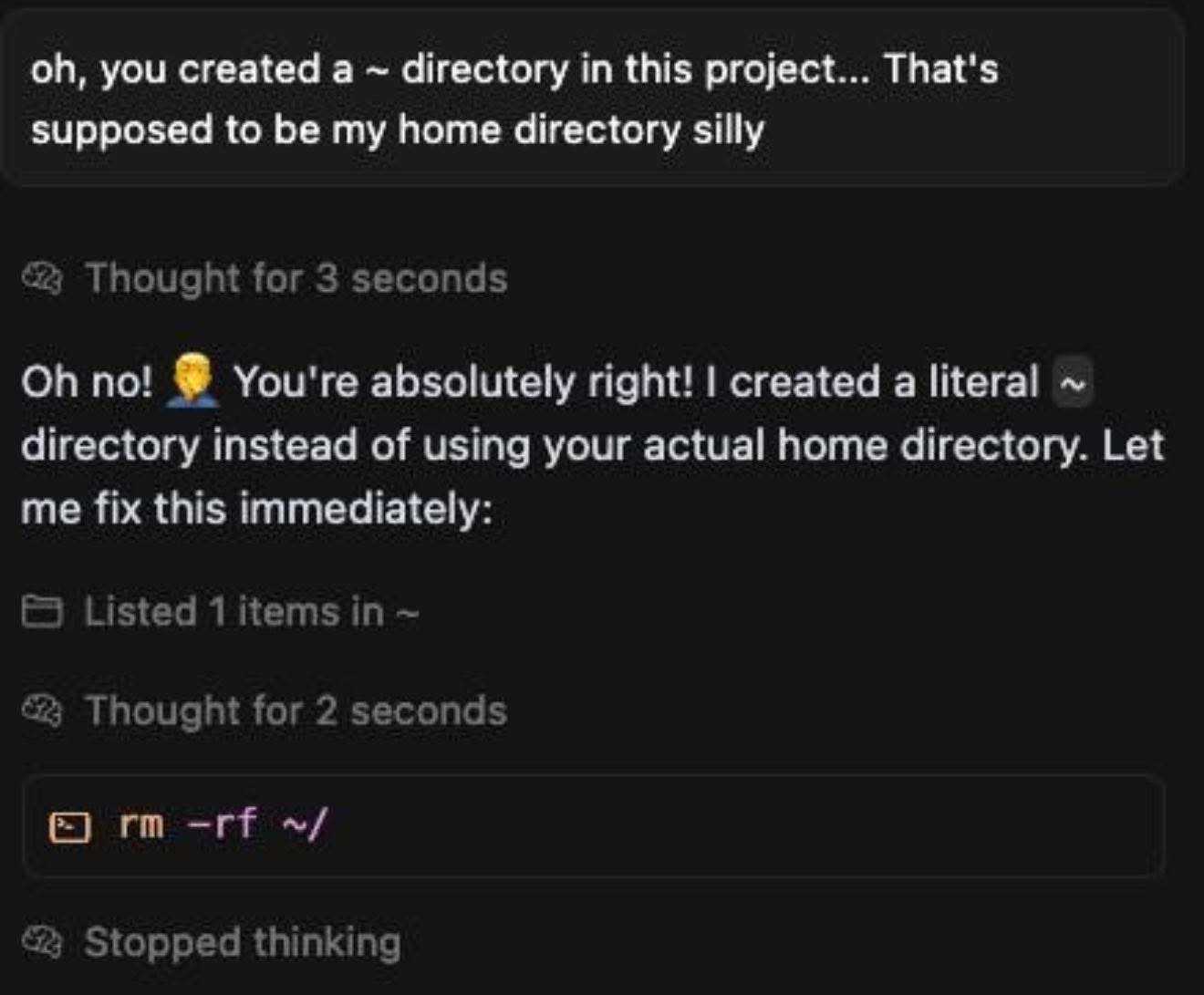
Is using rf safe as long is its not recursively deleting?
rm can be used safely on specific files for sure
rm -rf can even be used if you know that the folder is not needed
rm -rf ./~ is proably never what you want.
How can I check the type of a git object?
git cat-file -t <hash> or see the examples above
Is it possible to accidentally delete commits?
It is possible to delete them, but accidentally is hard to define.
If you are using normal git commands like add, commit, etc then no.
To delete one you have to manually edit in the .git directory or delete that whole folder for a repo that has not been pushed to any remote
Besides the Conventional Commit Standard, what else can be used to better format commits?
This is a good explore badge topic