Last week, we learned about what a commit is and then we took a break from how git works, to talk more about how developers communicate about code
study tip
We will go in and out of topics at times, in order to provides what is called spaced repetition, repeating material or key concepts with breaks in between.
Using git correctly is a really important goal of this course because git is an opportunity for you to demonstrate a wide range of both practical and conceptual understanding.
So, I have elected to interleave other topics with git to give core git ideas some time to simmer and give you time to practice them before we build on them with more depth at git.
Also, we are both learning git and using git as a motivating example of other key important topics.
git definition
From here, we have the full definition of git
We do not start from that point, because these documents were written for target audience of working developers who:
are familar with other, old version control systems and learning an additional one
are familiar with the detials of how file systems work
Why so much git?
Today, we are going to learn what git is and later we will learn more details of how it is implemented.
Remember we are spending so much time with git for two reasons:
it is an important developer tool
it demonstrates important concepts that occur in other areas of CS
Most current undergraudate students, however, have probably not used another version control system.
So, we took a different path, we started using it to see how it relates to our work as a developer, before we actually came to this defimintion.
Now, we wil break that definition down.
Git is a File system
Content-addressable filesystem means a key-value data store.
some examples of key-value pairs that you have seen in computer science broadly, and in this course specficially
python dictionaries
pointers (address,content)
parameter, passed values
yaml files
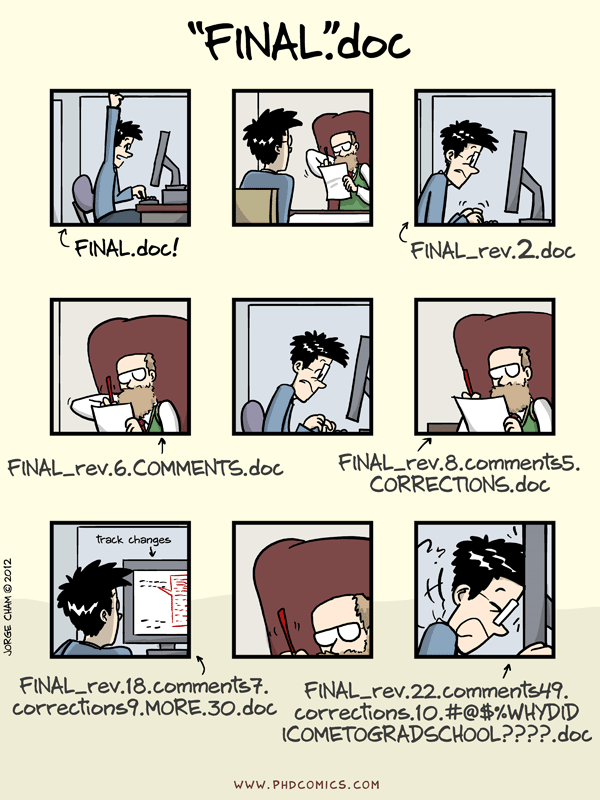
Git is a Version Control System
In the before times
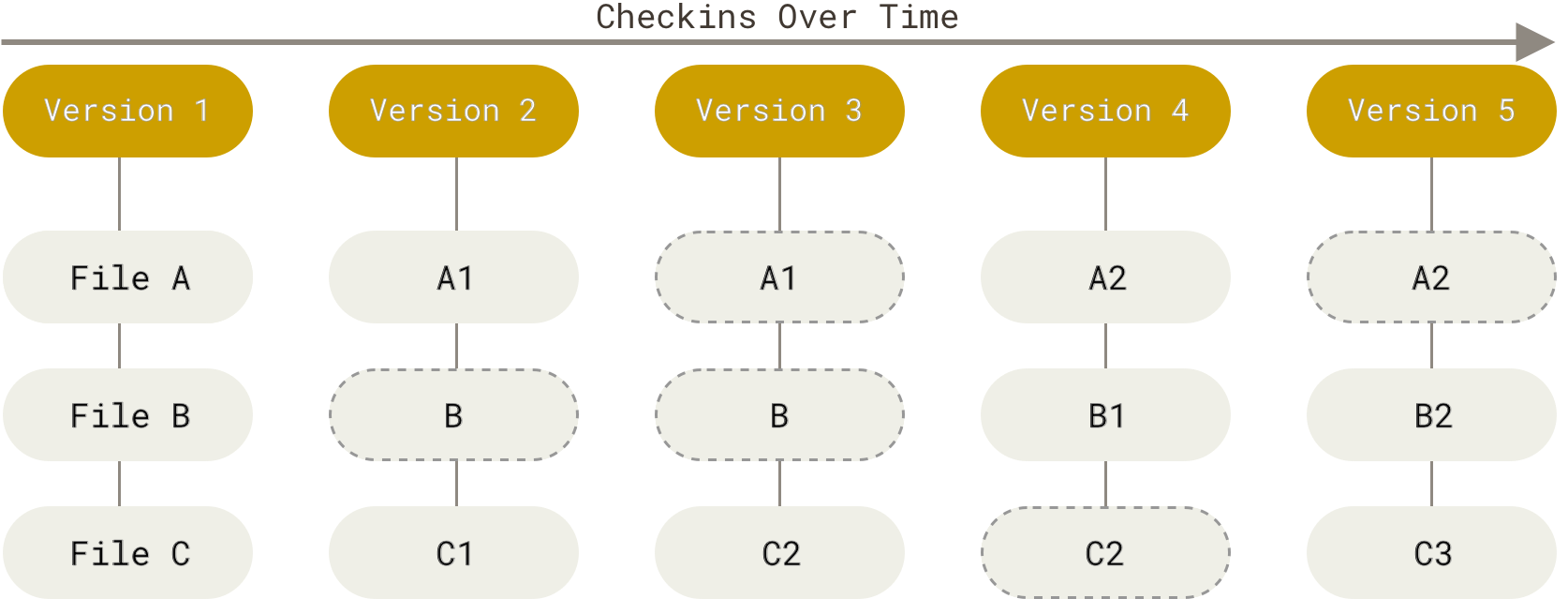
git stores snapshots of your work.
it uses 3 stages:
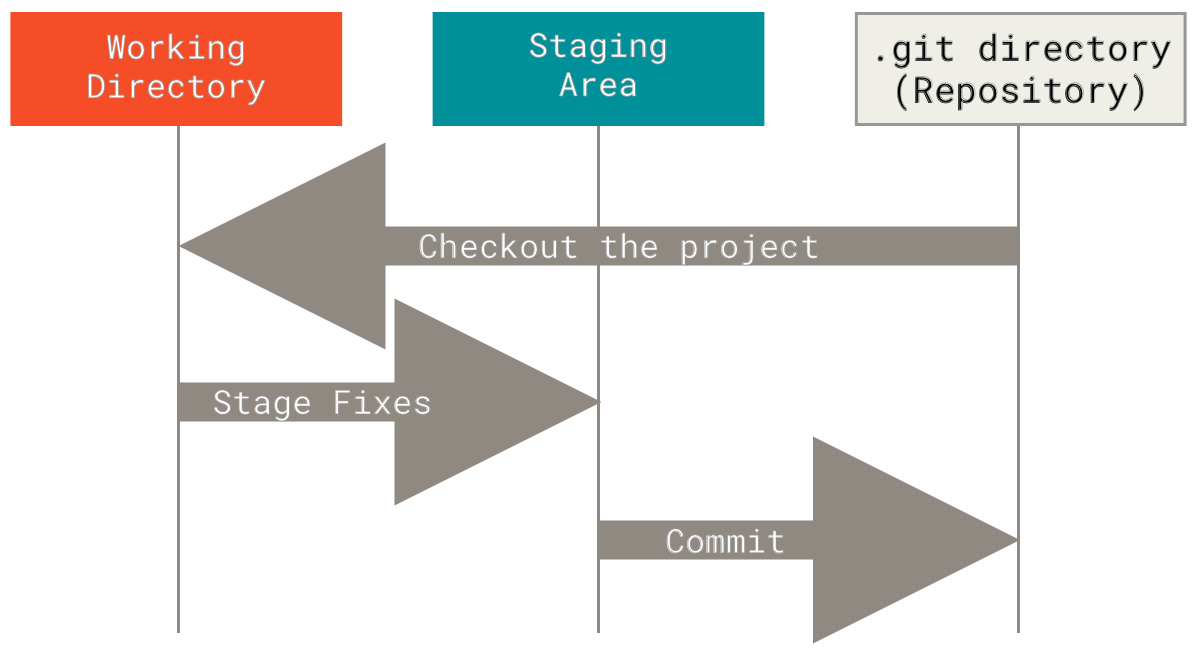
These three stages are the in relation to your working directory, and potentially remotes.
So in broader context, the git visual cheatsheet is a more complete picture and has commands overlayed with the concept.
Git has two sets of commands
Porcelain: the user friendly VCS
Plumbing: the internal workings- a toolkit for a VCS
Can you use the definitions above to figure out which are porcelain and which ar plumbing?
1 2 3 4 5git commit git cat-file git add git status git hash-object
THe highlighted ones are porcelain commands, because do *version control operations
1 2 3 4 5git commit git cat-file git add git status git hash-object
The highlighted commands are plumbing commands.
1 2 3 4 5git commit git cat-file git add git status git hash-object
a lot of programming is designing abstractions, to get good at making something, you study examples first- good and bad- to learn what to do, and not to do.
the above is a blog post by one of the co-founders and the 2010-2019 CEO of Stack Overflow Joel Spolsky
We have so far used git as a version control system. A version control system, in general, will have operations like commit, push, pull, clone. These may work differently under the hood or be called different things, but those are what something needs to have in order to keep track of different versions.
The plumbing commands reveal the way that git performs version control operations. This means, they implement the git file system operations for the git version control system.
One way to think of the plumbing vs porcelain commands kind of like public vs private methods. A user should typically only need the public methods (porcelain commands) but those use the private ones to get things done (plumbing commands). We will use the plumbing commands over the next few classes to examine what git really does when we call the porcelain commands that we will typically use.
Git is distributed
What does that mean?
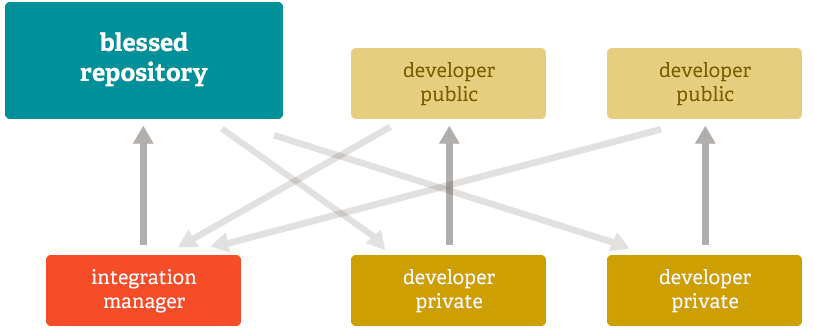
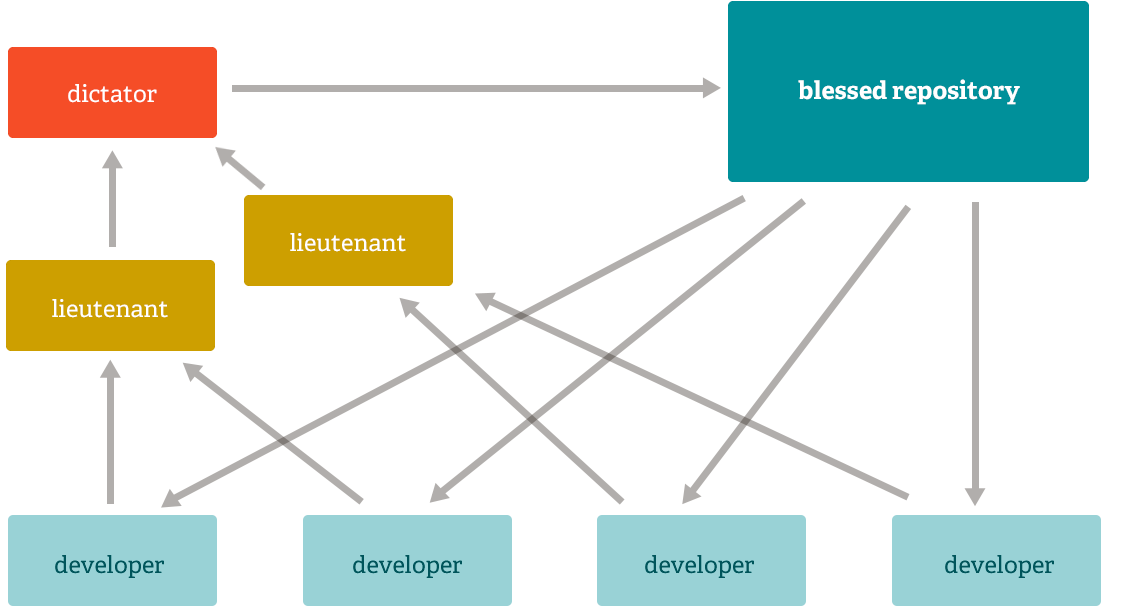
Git runs locally. It can run in many places, and has commands to help sync across remotes, but git does not require one copy of the repository to be the “official” copy and the others to be subordinate. git just sees repositories.
For human reasons, we like to have one “official” copy and treat the others as local copies, but that is a social choice, not a technological requirement of git. Even though we will typically use it with an offical copy and other copies, having a tool tht does not care, makes the tool more flexible and allows us to create workflows, or networks of copies that have any relationship we want.
It’s about the workflows, or the ways we socially use the tool.
Subversion Workflow
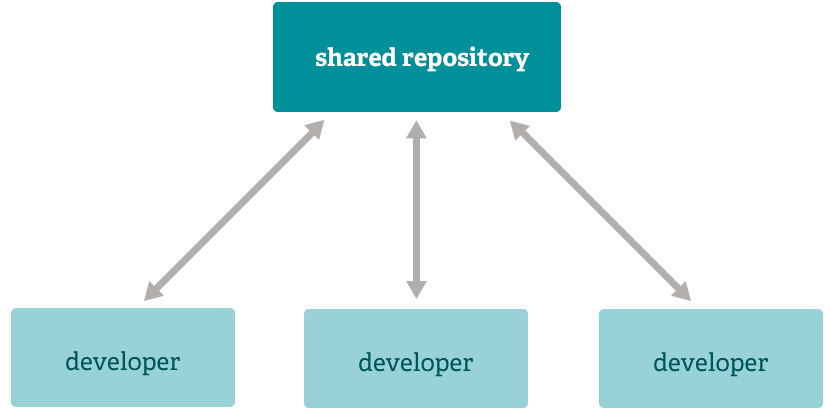
subversion is an older VCS
Integration Manager
dictator and lieutenants
How does git do all these things?
Let’s look at git again in our github-inclass repo
cd gh-inclass-sp26-brownsarahm/lsabout.md docs README.md
abstract_base_class.py example.md scratch.ipynb
alternative_classes.py helper_functions.py setup.py
API.md important_classes.py tests
CONTRIBUTING.md LICENSE.mdWe can use the bash command find to search the file system note that this does not search the contents of the files, just the names.
find .git/objects/ -type f.git/objects/0c/14d9384ba886dabfc8aa96ec6efc6c54323eb3
.git/objects/50/1414964a033fad0ded26774634d62fd5d8f629
.git/objects/9e/ce5efa25710c8fad7d9f210928785b5362b06f
.git/objects/3c/7ace1d193b78129c10d61609cbe97b2686f202
.git/objects/56/39f2d42c61733765f3d23a71a3f72c87ec8a99
.git/objects/51/713980cd526ed8680e747b238cb7227616191a
.git/objects/93/c08483f44ebdf5ce10e6c0002e641aa0cc8844
.git/objects/9d/6ffa6ded47d8b6df13ed60e482b188015ee499
.git/objects/9c/6f44fc42e4e9b5a827c29aa72c7846ea2d6ccf
.git/objects/be/c4b834fac4a790f07e2885d1bbe28eb6182c54
.git/objects/da/bdfb432d8ecb925c9a54dcd8634d4b87050243
.git/objects/a2/54c24301bc02c9624726573e902c8ffe437a0b
.git/objects/d1/c1df80396c1eb7f395dad955f83f6dd995861e
.git/objects/d8/7bf4a5641e0429fd3c371bd2b19d755105ca92
.git/objects/ab/e403c82238c3877b3437c1ab3e32499a60e24f
.git/objects/e2/c66faf077faaa6a826ca0df8b82e322f672fc9
.git/objects/f3/322b402f43870b79ee4459f2a6c1c2be9af04b
.git/objects/f2/e78bc13fe574934bb8e20b5289a49390617f34
.git/objects/cf/d464dc22568fcff6aa302fbd6025e44b7262ac
.git/objects/c1/b4f81358eaaf467ff4ce4b95171497c28d1622
.git/objects/18/5644ca9f6e49ee7a2da69bac459c06e7806b9d
.git/objects/pack/pack-8f6d46a9cf267bf98ae0dd77dee64723684fb568.idx
.git/objects/pack/pack-8f6d46a9cf267bf98ae0dd77dee64723684fb568.pack
.git/objects/pack/pack-8f6d46a9cf267bf98ae0dd77dee64723684fb568.rev
.git/objects/16/d117e2688b8233db6d1d39a84bba02b698ce82
.git/objects/1f/6ef3acccb91bc0c33661854903ec5e7d666fb5
.git/objects/74/3db376fa76bb3611cfac6935938d179330c7eb
.git/objects/17/4104846f6d51a714a5b9b5cab3ca0cc446d91b
.git/objects/21/9c49c573315e67e15c080f0c03271bbb7a8cd2
.git/objects/21/adcda986999bfedba045b1d9e4ecac3efe2a6a
.git/objects/75/79d39b166da1c88fb70925b39ba60c72c0b072
.git/objects/2a/11d8b533945e5e30709759c6ba009d9434c114
.git/objects/2f/c2613fb6832eddb3db56f73be588259be44a5b
.git/objects/91/a367b0145a68086f9d0de36da98c7c7a59f8df
.git/objects/3a/4533a3abbc749f5e1905b30eb187a7350ae71a
.git/objects/39/d5708913a6c708d1a505cde6da544785c086a6
.git/objects/63/063aaa7d1dad782e0349d897fcf33ff16a7e5d
.git/objects/d3/980efccf4856f0c61a6a16ed40be534c5230a5
.git/objects/ba/a1bd86c8580e5cf12f017369ff0a82e43b53c4
.git/objects/ba/7a1e6b5fbd737d7ecb2cd54e32866121a476aa
.git/objects/b0/20e21272ba05cff974b1f789bdf5cfd2f5d355
.git/objects/f9/e70e5b8173525188a6b10ce5979972de4e0d9f
.git/objects/f6/886babaa283a8238632930bf2cca9121fc274b
.git/objects/f1/2ab37d38d99f0cda616ae2cbb9f7eb1e7ed58f
.git/objects/ce/430e9745738c4b8818e2d527d303ca1b5d0f9e
.git/objects/e0/f340c90f46a0103ee3dac9cfdc5520e4848731
.git/objects/2d/232a2231c650dc4094606797fe0bd3e0ce4c65
.git/objects/70/203779023e61da6f9190204424d5e361173f78
.git/objects/1e/c17bc743268ac12fffa97d7b2dddd32d93b947
.git/objects/1e/97f0d64fc62f40bbeb0eba19fa696fe47b7ccc
.git/objects/76/2f01b5cf84f39096d55ca95e46f0519d8cae48This is a lot of files! It’s more than we have in our working directory.
This is a consequence of git taking snap shots and tracking both the actual contents of our working directory and our commit messages and other meta data about each commit.
Git Variables
the program git does not run continously the entire time you are using it for a project. It runs quick commands each time you tell it to, it’s goal is to manage files, so this makes sense. This also means that important information that git needs is also saved in files.
We can see the files that it has by listing the directory:
ls .git/COMMIT_EDITMSG FETCH_HEAD index objects REBASE_HEAD
config HEAD info ORIG_HEAD refs
description hooks logs packed-refsthe files in all caps are like gits variables.
Lets look at the one called HEAD we have interacted with HEAD before when resolving merge conflicts.
cat .git/HEADref: refs/heads/organizeHEAD is a pointer to the currently checked out branch.
The other files with HEAD in their name are similarly pointers to other references, named corresponding to other things.
We can also trace and see what commit is at that point.
cat .git/refs/heads/organized1c1df80396c1eb7f395dad955f83f6dd995861egit log --pretty=onelinewe Can see the first commit here, labeled with HEAD matches above. Tracing as we did above, is what git log and git status do.
d1c1df80396c1eb7f395dad955f83f6dd995861e (HEAD -> organize, origin/organize)  start organizing
219c49c573315e67e15c080f0c03271bbb7a8cd2 add title to readme
ba7a1e6b5fbd737d7ecb2cd54e32866121a476aa (origin/main, origin/HEAD, main) Merge pull request #6 from compsys-progtools/organizing_ac
ce430e9745738c4b8818e2d527d303ca1b5d0f9e (origin/organizing_ac) add files for organizing activity
f6886babaa283a8238632930bf2cca9121fc274b (my_branch_checkedoutb, my_branch) Merge pull request #5 from compsys-progtools/2-create-an-about-file
cfd464dc22568fcff6aa302fbd6025e44b7262ac (origin/2-create-an-about-file, 2-create-an-about-file) Update about.md
a254c24301bc02c9624726573e902c8ffe437a0b create empty about
67010e313ae6a25d88b4d704769d1c46e6680d35 add online IDE url
3990d7285e7ec3390d9069fda3f37e2231f78664 Setting up GitHub Classroom Feedback
05b77103b9878a3b14fb0a2ca58bee76fdf56732 (origin/feedback) GitHub Classroom Feedback
9b61eadc429770d40b30f3a51af3ef69dc843e35 Initial commit
ls .git/COMMIT_EDITMSG FETCH_HEAD index objects REBASE_HEAD
config HEAD info ORIG_HEAD refs
description hooks logs packed-refsWe saw the local HEAD already, so we can also compare to the origin manually
cat .git/ORIG_HEADthis is a different commit, several back in the list from git log
f6886babaa283a8238632930bf2cca9121fc274bBranches are like pointers
I have said this before and we hav used it conceptually, but now we can see this as it implemented
cat .git/HEADref: refs/heads/organizeIt tells us that the HEAD is currently a ref, which branches are one type of. Specifically branches are stored in the refs/heads folder.
Now we can look at what is in that file
cat .git/refs/heads/organized1c1df80396c1eb7f395dad955f83f6dd995861eGit Objects
There are 3 (main) types:
blob objects: the content of your files (data)
tree objects: stores file names and groups files together (organization)
Commit Objects: stores information about the sha values of the snapshots
Examining git objects
we are on the main branch so we can merge organize into main like:
git merge organizeThis is equivalent to:
git merge organize mainUpdating ba7a1e6..cbdb5fc
Fast-forward
.gitignore | 1 +
README.md | 20 ++++++++++++++++++++
_config.yml => docs/_config.yml | 0
_toc.yml => docs/_toc.yml | 0
philosophy.md => docs/philosophy.md | 0
tsets_abc.py => tests/tests_abc.py | 0
tests_alt.py => tests/tests_alt.py | 0
tests_helpers.py => tests/tests_helpers.py | 0
tests_imp.py => tests/tests_imp.py | 0
9 files changed, 21 insertions(+)
create mode 100644 .gitignore
rename _config.yml => docs/_config.yml (100%)
rename _toc.yml => docs/_toc.yml (100%)
rename philosophy.md => docs/philosophy.md (100%)
rename tsets_abc.py => tests/tests_abc.py (100%)
rename tests_alt.py => tests/tests_alt.py (100%)
rename tests_helpers.py => tests/tests_helpers.py (100%)
rename tests_imp.py => tests/tests_imp.py (100%)it gives the summary and is all done!
Now our main branch is organized (somewhat)
lsabout.md docs README.md
abstract_base_class.py example.md scratch.ipynb
alternative_classes.py helper_functions.py setup.py
API.md important_classes.py tests
CONTRIBUTING.md LICENSE.mdPrepare for Next Class
If on windows, you may need to reinstall gitbash or follow other steps from the gh docs mintty page for the following steps to work locally
install jupyterbook this is not the same as
jupyter laborjupyter notebookthat 310 usesMake sure that the
ghCLI tool works by using it to create an issue called test on your kwl repo withgh issue create. If on Windows try reinstalling with minttyPost an example of documentation for libraries, frameworks, or developer tools that you have used and make a post on the class discussion board. Refresh your memory of the one you post and skim through two other examples.
Badges
Review the notes from today
Read about different workflows in git and describe which one you prefer to work with and why in favorite_git_workflow.md in your kwl repo. Two good places to read from are Git Book and the atlassian Docs
In commit_contents.md, redirect the content of your most recent commit to your kwl repo, its tree, and the contents of one blob. Edit the file or use
echoto put markdown headings between the different objects. Add a title# Complete Committo the top of the file and at the bottom of the file add## Reflectionsubheading with some notes on how, if at all this excercise helps you understand how git works.
Review the notes from today
Read about different workflows in git and add responses to the below in a workflows.md in your kwl repo. Two good places to read from are Git Book and the atlassian Docs
Update your kwl chart with what you have learned or new questions in the want to know column
Find the hash of the content of your completed workflows.md file and put that in the comment of your badge PR for this badge. Try to do this from your local CLI, but full credit even if you use the website interface
## Workflow Reflection

1. Why is it important that git can be used with different workflows?
1. Which workflow do you think you would like to work with best and why?
1. Describe a scenario that might make it better for the whole team to use a workflow other than the one you prefer.