Setup
Let’s take some time to set up what we are going to talk about today.
We will talk about two main things:
Unix Philosophy
Strategies to study systems
Discussion
At your tables:
share your responses to the work in the prep work for today’s topic
discuss any similiarities or differences
if any, send back questions you have
if any, send points you want to share to the whole class
Sometimes in CS, we focus on correctness and speed as the only measures of a design’s quality. Other times we even treat design as an implicit property, focusing on implementation details, but that makes it hard to learn and keep track of.
Today’s goal is to be more explicit, disucssing some principles and seeing how you have already interacted with them.
Today we’re going to do a bit more practical stuff, but we are also going to start to get into the philosophy of how things are organized in unix.
Understanding the context and principles will help you:
remember how to do things
form reliable hypotheses about how to fix problems you have not seen before
help you understand when you should do things as they have always been done and when you should challenge and change things.
Why should we study design?
it is easy to get distracted by implementation, syntax, algorithms
the core principles of design organize ideas into simpler rules
Why are we studying developer tools?
The best way to learn design is to study examples [Schon1984, Petre2016], and some of the best examples of software design come from the tools programmers use in their own work.
note
we will talk about some history in this course
I will not take a “great men of history” approach
This is because:
I think that history is important context for making decisions
Many of these “great men” are actually, in many ways, Not Great
everything in computer science was made by people
all people are imperfect
when people are deeply influential, ignoring their role in history is not effective, we cannot undo what they did
we do not have to admire them or even say their names to acknowledge the work
computing technology has been used in Very Bad ways and in Definitely Good ways
Unix Philosophy
sources:
composability over monolithic design
social conventions
The tenets:
Make it easy to write, test, and run programs.
Interactive use instead of batch processing.
Economy and elegance of design due to size constraints (“salvation through suffering”).
Self-supporting system: all Unix software is maintained under Unix.
For better or worse unix philosophy is dominant, so understanding it is valuable.
This critique is written that unix is not a good system for “normal folks” not in its effectiveness as a context for developers which is where *nix (unix, linux) systems remain popular.
context:
“normal folks” is the author’s term; my guess is that it is attempting to describe a typical, nondeveloper computer user
terminology to refer to people has changed a lot over time; when we study concepts from primary sources, we have to interpret the document through the lens of what was normal at the time the document was written, not to excuse bad behavior but to not be distracted and see what is there
In what ways might it make sense to design developer tools differently than everyday user tools?
Philosophy in practice, using pipes
If you have the gh CLI installed and working locally: open the terminal that it works in and navigate to your KWL repo.
If you do not have gh CLI working locally, open a codespace on the main branch of your KWL repo
(I have it working locally and working locally lets me save my terminal output for the notes more easily)
To check if your gh CLI is working:
ghWork seamlessly with GitHub from the command line.
USAGE
gh <command> <subcommand> [flags]
CORE COMMANDS
auth: Authenticate gh and git with GitHub
browse: Open repositories, issues, pull requests, and more in the browser
codespace: Connect to and manage codespaces
gist: Manage gists
issue: Manage issues
org: Manage organizations
pr: Manage pull requests
project: Work with GitHub Projects.
release: Manage releases
repo: Manage repositories
GITHUB ACTIONS COMMANDS
cache: Manage GitHub Actions caches
run: View details about workflow runs
workflow: View details about GitHub Actions workflows
EXTENSION COMMANDS
classroom: Extension classroom
ALIAS COMMANDS
co: Alias for "pr checkout"
ADDITIONAL COMMANDS
agent-task: Work with agent tasks (preview)
alias: Create command shortcuts
api: Make an authenticated GitHub API request
attestation: Work with artifact attestations
completion: Generate shell completion scripts
config: Manage configuration for gh
copilot: Run the GitHub Copilot CLI (preview)
extension: Manage gh extensions
gpg-key: Manage GPG keys
label: Manage labels
preview: Execute previews for gh features
ruleset: View info about repo rulesets
search: Search for repositories, issues, and pull requests
secret: Manage GitHub secrets
ssh-key: Manage SSH keys
status: Print information about relevant issues, pull requests, and notifications across repositories
variable: Manage GitHub Actions variables
HELP TOPICS
accessibility: Learn about GitHub CLI's accessibility experiences
actions: Learn about working with GitHub Actions
environment: Environment variables that can be used with gh
exit-codes: Exit codes used by gh
formatting: Formatting options for JSON data exported from gh
mintty: Information about using gh with MinTTY
reference: A comprehensive reference of all gh commands
FLAGS
--help Show help for command
--version Show gh version
EXAMPLES
gh issue create
gh repo clone cli/cli
gh pr checkout 321
LEARN MORE
Use `gh <command> <subcommand> --help` for more information about a command.
Read the manual at https://cli.github.com/manual
Learn about exit codes using `gh help exit-codes`
Learn about accessibility experiences using `gh help accessibility`When we use it without a subcommand, it gives us help output a list of all the commeands that we can use. If it is not working, you would get a command not found error.
We will navigate to the kwl repo
cd kwl-sp26-brownsarahm/Let’s inpsect the action file that creates the issues for your badges.
cat .github/workflows/getassignment.ymlname: Create badge issues (Do not run manually)
on:
workflow_dispatch
# once you edit, change the name
jobs:
get-assignments:
runs-on: ubuntu-latest
steps:
- uses: actions/checkout@v6
# Install dependencies
- name: Set up Python
uses: actions/setup-python@v6
with:
python-version: 3.12
- name: Install Utils
run: |
pip install git+https://github.com/compsys-progtools/courseutils@main
- name: Get badge requirements
run: |
# prepare badge lines
pretitle="prepare-"$(cspt getbadgedate --prepare)
cspt getassignment --type prepare | gh issue create --title $pretitle --label prepare --body-file -
# review badge lines
rtitle="review-"$(cspt getbadgedate --review)
cspt getassignment --type review | gh issue create --title $rtitle --label review --body-file -
# practice badge lines
pratitle="practice-"$(cspt getbadgedate --practice)
cspt getassignment --type practice | gh issue create --title $pratitle --label practice --body-file -
env:
GH_TOKEN: ${{ secrets.GITHUB_TOKEN }}
# edit the run step above for the level(s) you want.
# You should keep the prepare, because they are required for experience badges
# You may choose to get only the review or only the practice (and change this any time)We see that several things, but this output is also kind of long,
We can cut only a part of the output by using a pipe. A pipe connects the output of one command to the input of the next. It uses stdout and stdin files to do this.
The head command returns the top of a file and its -n option lets us choose how many lines at the top of the file, so we will use this to get the first 26 lines.
cat .github/workflows/getassignment.yml | head -n 26(I picked 26 & 6 in advance to get the right number for this example, this)
name: Create badge issues (Do not run manually)
on:
  workflow_dispatch

# once you edit, change the name

jobs:
  get-assignments:
    runs-on: ubuntu-latest
    steps:
    - uses: actions/checkout@v6

    # Install dependencies
    - name: Set up Python
      uses: actions/setup-python@v6
      with:
        python-version: 3.12

    - name: Install Utils
      run: |
        pip install git+https://github.com/compsys-progtools/courseutils@main
    - name: Get badge requirements
      run: |
        # prepare badge lines
        pretitle="prepare-"$(cspt getbadgedate --prepare)
        cspt getassignment --type prepare | gh issue create --title $pretitle --label prepare --b
Here we see a few key things:
the
Install Utilsstep, installs some custom code.on the last line it uses a pipe
|to connect a commandsysgetassignmentto thegh issue createcommand.the
gh issue createcommand uses the--body-fileoption with a value-; this uses std in, but since this is to the right of the pipe, it puts the output of the first command into this optionthe 2nd to last line creates a variable (we will learn this more later) and the last line uses that variable
We can use multiple pipes to take a chunk from the middle by taking the top and then the bottom of that
cat .github/workflows/getassignment.yml | head -n 26 | tail -n 5 - name: Get badge requirements
run: |
# prepare badge lines
pretitle="prepare-"$(cspt getbadgedate --prepare)
cspt getassignment --type prepare | gh issue create --title $pretitle --label prepare --body-file -How do we Study (computer) Systems
When we think of something as a system, we can study it different ways:
input/output behavior
components
For complex systems, we also use abstraction
These basic ideas apply whether a computer system or not. We can probe an object that we want to udnerstand in different ways.
In a lot of disciplines people are taught one or the other, or they divide professionally into theorists or experimentalists along the lines.
People are the most effective at working with, within, and manipulating systems when they have multiple ways to achieve the same goal.
These are not mutually exclusive, we will use them all together in this course.
When we study a system we can do so in three main main ways. We can look at the input/output behavior of the system as a whole, we can look at the individual components, or we can adopt the abstractions that were developed.
For each component, we can look at its behavior or the subcomponents. We can take what we know from all fo the components and piece that together. However, for a complex system, we cannot match individual components up to the high level behavior. This is true in both computers and other complex systems. In the first computers in the 1940s, the only things they did was arithmetic and you could match from their components al the way up pretty easily. Modern computers connect to the internet, send signals, load complex graphics, play sounds and many other things that are harder to decompose all at once.
Outside of computers, scientists have a pretty good idea of how neurons work and that appears to be the same across mammals and other species (eg squid) but we do not understand how the whole brain of a mammal works, not even smaller mammals with less complex social lives than humans. Understanding the parts is not always enough to understand all of the complex ways the parts can work together. Computers are much less complicated than brains. They were made by brains.
But that fact motivates another way to study a complex system, across levels of abstraction. You can abstract away details and focus on one representation. This can be tied literally to components, but it can also be conceptual. For example, in CSC211 you use a model of stack and heap for memory. It’s useful for understanding programming, but is not exactly what the hardware does. At times, it is even more useful though than understanding exactly what the hardware does. These abstractions also serve a social, practical purpose. In computing, and society at large really, we use standards these are sets of guidelines for how to build things. Like when you use a function, you need to know it’s API and what it is supposed to do in order to use it. The developers could change how it does that without impacting your program, as long as the API is not changed and the high level input/output behavior stays the same.
Behavior
Try something, see what happens
This is probably how you first learned to use a computer. Maybe a parent showed you how to do a few things, but then you probably tried other things. For most of you, this may have been when you were very young and much less afraid of breaking things. Over time you learned how to do things and what behaviors to expect. You also learned categories of things. Like once you learned one social media app and that others were also social media you then looked for similar features. Maybe you learned one video game had the option to save and expected it in the next one.
Video games and social media are classes or categories of software and each game and app are instances. Similarly, an Integrated Development Environment (IDE) is a category of software and VS Code, ... are instances. Also, version control is a category of software and git is an instance. A git host is also a category and GitHub is an instance. Just as before you were worried about details you transferred features from one instance to another within categories, I want you to think about what you know from one IDE and how that would help you learn another. We will study the actual features of IDE and what you might want to know about them so that you can choose your own. Becoming a more independent developer you’ll start to have your own opinions about which one is better. Think about about a person in your life who finds computers and technology overall intimidating or frustrating. They likely only use one social media app if at all, or maybe they only know to make documents in Microsoft word and they think that Google Docs is too much to learn, because they didn’t transfer ideas from one to the other.
We have focused on the behavior of individual applications to this point, but there is also the overall behavior of the system in broad terms, typing on the keyboard we expect the characters to show (and when they don’t for example in a shell password, we’re surprised and concerned it is not working).
Components
Take it apart, asess the pieces
We have the high level parts: keyboard, mouse, monitor/screen, tower/computer. Inside we also tend to know there is a power supply, a motherboard, graphics card, memory, etc.
We can study how each of these parts works while not worrying about the others but having them there. This is probably how you learned to use a mouse. You focused your attention on the mouse and saw what else happened.
Or we can take an individual component and isolate it to study it alone. For a mouse this would be hard. Without a computer attached its output is not very visible. To do this, we would need additional tools to interpret its output and examine it. Most computer components actually would need additional tools, to measure the electrical signals, but we could examine what happens at each part one at a time to then build up what they do.
This idea, however that we can use another tool to understand each component is an important one. This is also a way to again, take care and study each piece even within a software-alone system without worrying about the hardware.
Abstraction
use a model
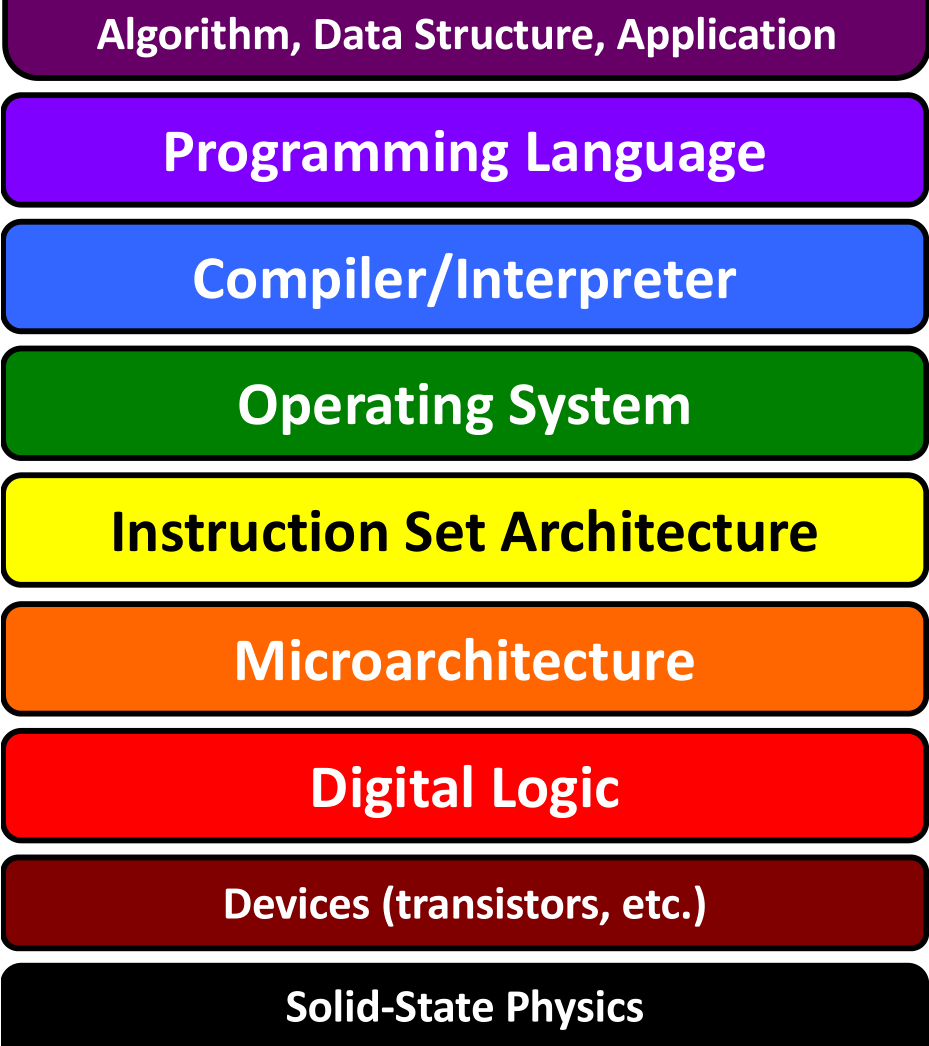
As we talked about the behavior and abstraction, we talked some about software and some about hardware. These are the two coarsest ways we can think about a computer system at different levels of abstraction. We can think about it only in physical terms and examine the patterns of electricity flow or we can think about only the software and not worry about the hardware, at a higher level of abstraction.
Let’s take a simple example, let’s say we are talking about a simple search program that we wrote that finds xx. We can say that you put in a part of a file name and it shows you all the ones with a similar name. That description is at the application level it gives the high level behavior, but not the step by step of how it does it. Let’s say we implemented it using binary search.
That’s the algorithm level, this is still abstract and could be implemented in different ways, but we know the steps and we can use this to know some things about how fast it will be, what types of result swill make it slower, etc.
At the programming level language then we know which language it was done in and we see more details. At this level, we can see the specific data structures and controls structures. These implementation details can also impact performance in terms of space(memory) or time. Still at this level, we do not need to know how the actual hardware works, but we see it in increasing detail.
At each level we have different types of operations. At the application we might have input, press enter, get results. At the algorithm we have check the value, compare. At the programming language level we need more specifics too, like assign or append.
After the Programming language level, there is assembly. The advantage to assembly is that it is hardware independent and human readable. It is low level and limited to what the hardware can do, but it is a version of that that can be run on different hardware. It is much lower level. When you compile a program, it is translated to assembly. At this level, programs written in different level become indistinguishable. This has much lower level operations. We can do various calculations, but not things like compare. Things that were one step before, like assign become two, choose a memory location, then write to memory.
Machine code translates to binary from assembly.
The instruction set architecture is, notice, where the line between software and hardware lives. This is because these are specific to the actual hardware, this is the level where there are different instructions if you have an Intel chip vs an Apple chip. This level reduces down the instructions even more specifically to the specifics things that an individual piece of hardware does and how they dit.
The microarchitecture is the specific circuits: networks of smaller individual components. Again, we can treat the components as blocks and focus on how they work together. At this level we still have calculations like add, multiply, compare, negate, and we can store values and read them. That is all we have at this point though. At this level there are all binary numbers.
The actual gates (components that implement logical operations) and registers (components that hold values) break everything down to logical operations. Instead of adding, we have a series of and, nand, or, and xor put together over individual bits. Instead of numbers, we have registers that store individual zeros or ones. In a modern digital, electrical computer, at this level we have to actually watch the flow of electricity through the circuit and worry about things like the number of gates and whether or not the calculations finish at the same time or having other parts wait so that they are all working together. We will see later that when we try to allow multiple cores to work independently, we have to handle these timing issues at the higher levels as well. However, a register and gate can be implemented in different ways at the device level.
The device (or transistor in modern electrical digital computers) level, is where things transition between analog and digital. The world we live in is actually all analog. We just pay attention to lots of things at a time scale at which they appear to be be digital. Over time devices have changed from mechanical switches to electronic transistors. Material science innovations at the physics level have improved the transistors further over time, allowing them to be smaller and more heat efficient. Because of abstraction, these changes could be plugged into new hardware without having to make any changes at any software levels. However, they do enable improvements at the higher levels.
Prepare for Next Class
review the notes on what is a commit. In gitdef.md on the branch for this issue, try to describe git in the four ways we described a commit. the point here is to think about what you know for git and practice remembering it, not “get the right answer”; this is prepare work, we only check that it is complete, not correct
Start recording notes on how you use IDEs for the next couple of weeks using the template file below. We will come back to these notes in class later, but it is best to record over a time period instead of trying to remember at that time. Store your notes in your fall24 repo in idethoughts.md on a dedicated
ide_prepbranch. This step is prep for after a few weeks from now, not for the date listed; keep this branch open until it is specifically asked for You can make a subissue of this step if you want to try that feature out.
Badges
Review the notes from today
Most real projects partly adhere and at least partly deviate from any major design philosophy or paradigm. Review the open source project you looked at for the
software.mdfile from before and decide if it more adheres to or deviates from the unix philosophy. Add a## Unix Philosophy <Adherance/Deviation>section to your software.md, setting the title to indicate your decision and explain your decision in that section. Provide at least two specific examples, using links to specific lines of code or specific sections in the documentation that support your claims.create methods.md and answer the following:
- Reflecting on your own programming practice, is initial understanding of concepts or debugging later more challenging for you? and why? Your answer here will be "your chosen context" for the rest of the questions.
- which of the three methods for studying a system do you use most often in your chosen context? Give an example, like an anectdote of learning something new or a tricky bug you solved.
- do you think using a different strategy might help you in your chosen context sometimes? why or why not?
Review the notes from today
Most real projects partly adhere and at least partly deviate from any major design philosophy or paradigm. Add a
## Unix Philosophysection to your software.md about how that project adheres to and deviates from the unix philosophy. Be specific, using links to specific lines of code or specific sections in the documentation that support your claims. Provide at least one example of both adhering and deviating from the philosophy and three total examples (that is 2 examples for one side and one for the other). You can see what badgesoftware.mdwas previously assigned in and the original instructions on the KWL file list.create methods.md and answer the following:
- which of the three methods for studying a system do you use most often when debugging? Give an example
- which do you use when you are trying to understand something new? Is it the same as when you are debugging? why or why not
- do you think the ones you use most often are consistently effective? why or why not? When do they work or not work? (for either learning new thing or debugging)
- what are you most interested in trying that might be different for either learning new things or debugging?