Last week, we learned about what a commit is and then we took a break from how git works, to talk more about how developers communicate about code.
We will go in and out of topics at times, in order to provides what is called spaced repetition, repeating material or key concepts with breaks in between.
Using git correctly is a really important goal of this course because git is an opportunity for you to demonstrate a wide range of both practical and conceptual understanding.
So, I have elected to interleave other topics with git to give core git ideas some time to simmer and give you time to practice them before we build on them with more depth at git.
Also, we are both learning git and using git as a motivating example of other key important topics.
Why so much git?
Today, we are going to learn what git is and later we will learn more details of how it is implemented.
Remember we are spending so much time with git for two reasons:
it is an important developer tool
it demonstrates important concepts that occur in other areas of CS
python3git definition
From the git book, we have the full definition of git
We do not start from that point, because these documents were written for target audience of working developers who:
are familar with other, old version control systems and learning an additional one
are familiar with the detials of how file systems work
Let’s break down the definition
Git is a File system
Content-addressable filesystem means a key-value data store.
some examples of key-value pairs that you have seen in computer science broadly, and in this course specficially
python dictionaries (see below)
pointers (address,content)
parameter, passed values
yaml files (e.g. the github action files, like getassignment.yml)
here is an exmple using a small dictionary
my_dict = {'a':5, 'b':7}then we can access the items by the key
my_dict['a']5this gives a more semantic way of accesing items than a regular list or array
Git is a Version Control System
Without a version control system
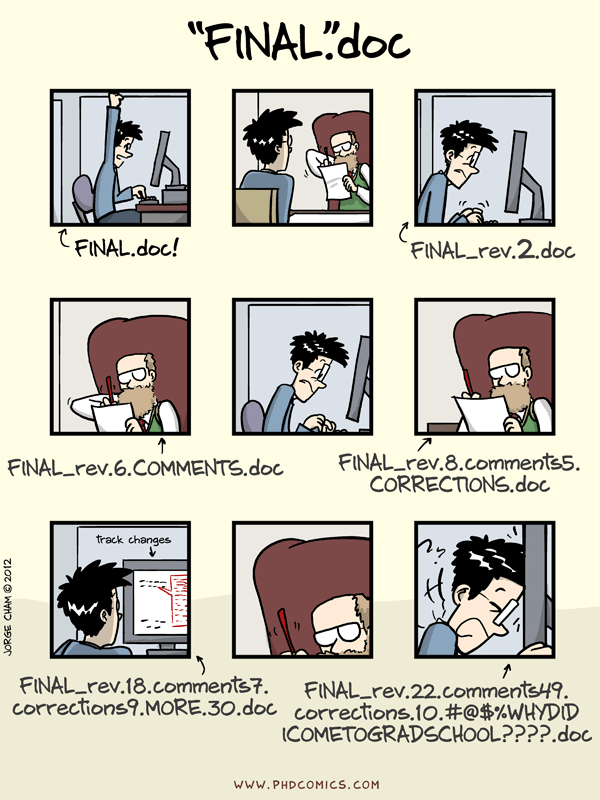
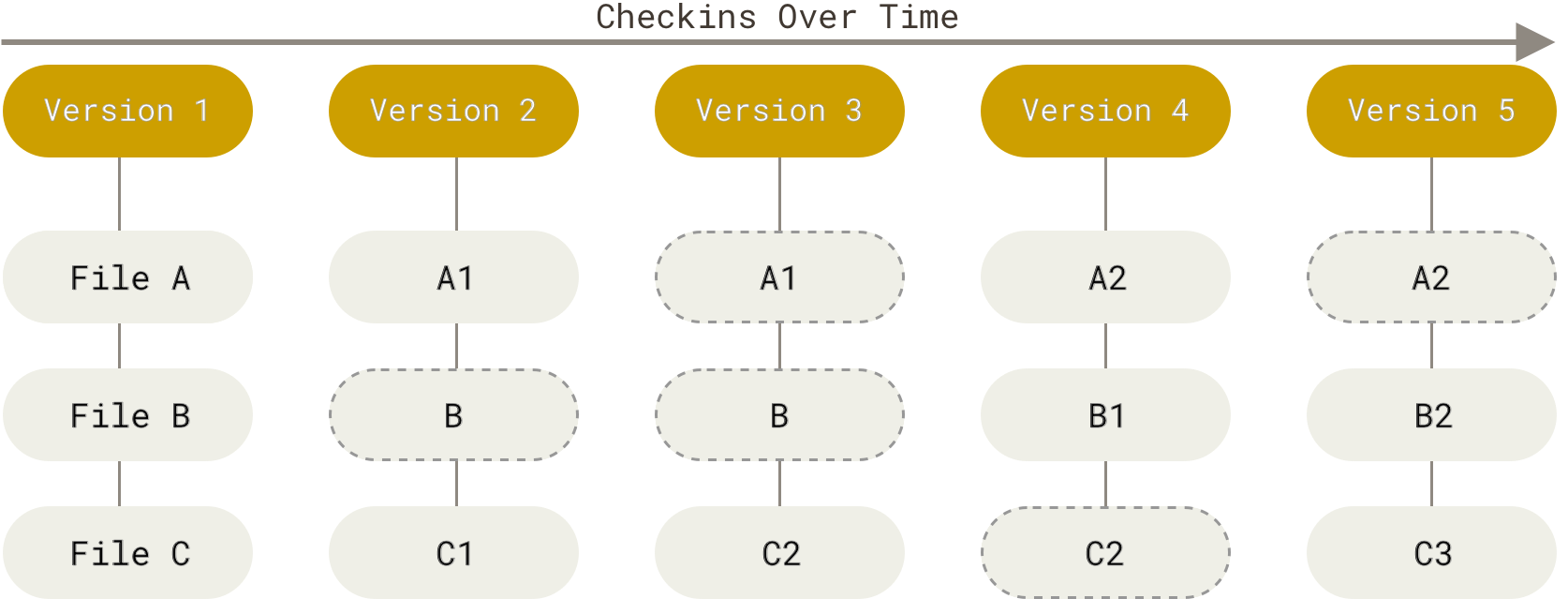
git stores snapshots of your work.
it uses 3 stages:
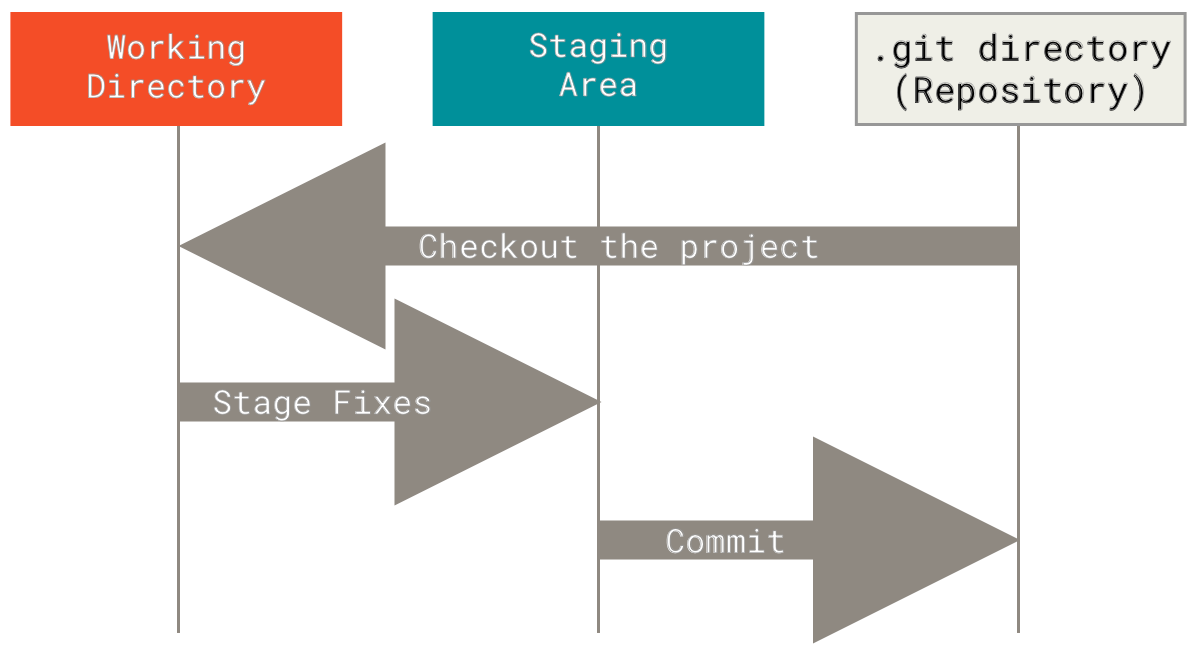
These three stages are the in relation to your working directory, and potentially remotes.
So in broader context, the git visual cheatsheet is a more complete picture and has commands overlayed with the concept.
Git has two sets of commands
Porcelain: the user friendly VCS
Plumbing: the internal workings- a toolkit for a VCS
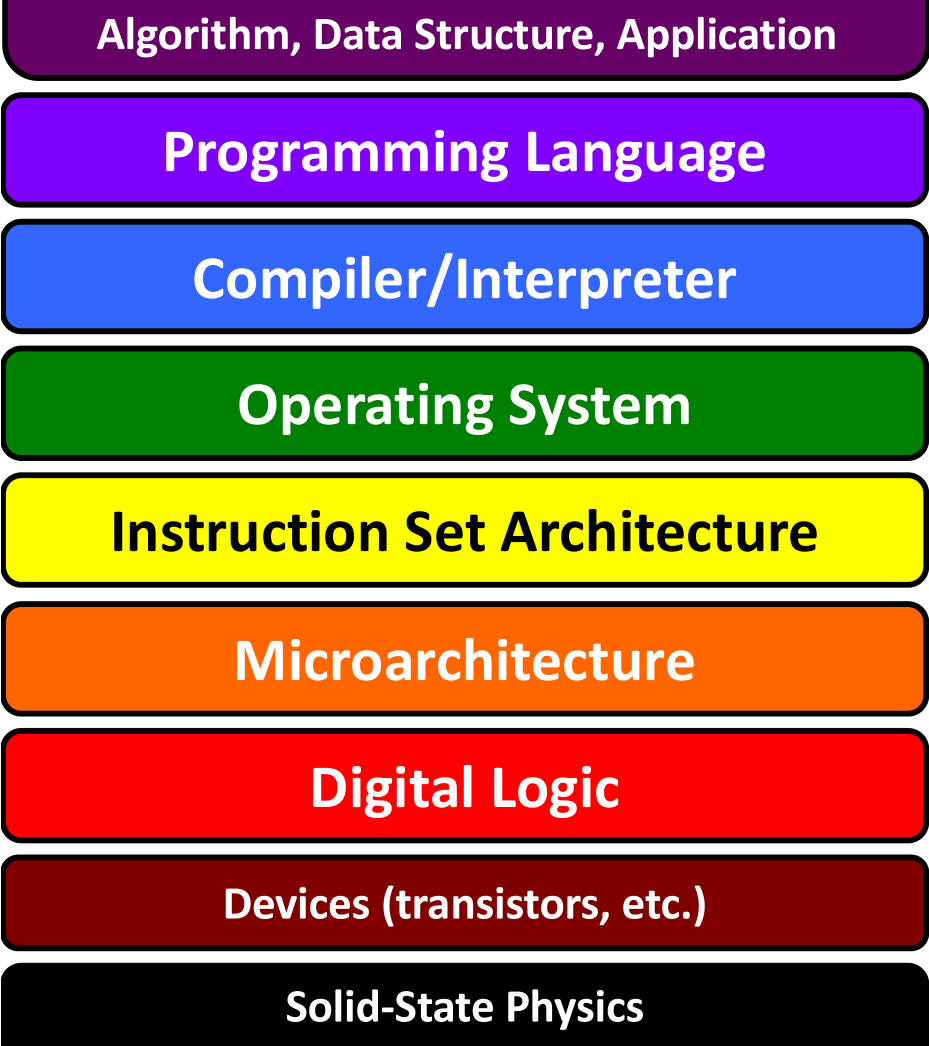
a lot of programming is designing abstractions, to get good at making something, you study examples first- good and bad- to learn what to do, and not to do.
the above is a blog post by one of the co-founders and the 2010-2019 CEO of Stack Overflow Joel Spolsky
We have so far used git as a version control system, using the porcelain commands. A version control system, in general, will have operations like commit, push, pull, clone. These may work differently under the hood or be called different things, but those are what something needs to have in order to keep track of different versions.
The plumbing commands reveal the way that git performs version control operations. This means, they implement the git file system operations for the git version control system.
One way to think of the plumbing vs porcelain commands kind of like public vs private methods. A user should typically only need the public methods (porcelain commands) but those use the private ones to get things done (plumbing commands). We will use the plumbing commands over the next few classes to examine what git really does when we call the porcelain commands that we will typically use.
Git is distributed
What does that mean?
Git runs locally. It can run in many places, and has commands to help sync across remotes, but git does not require one copy of the repository to be the “official” copy and the others to be subordinate. git just sees repositories.
For human reasons, we like to have one “official” copy and treat the others as local copies, but that is a social choice, not a technological requirement of git. Even though we will typically use it with an offical copy and other copies, having a tool tht does not care, makes the tool more flexible and allows us to create workflows, or networks of copies that have any relationship we want.
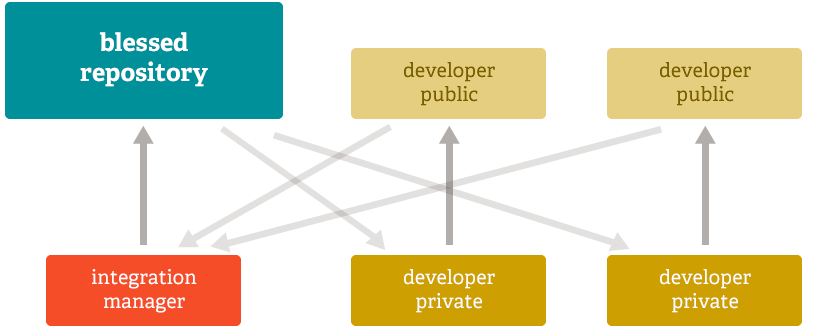
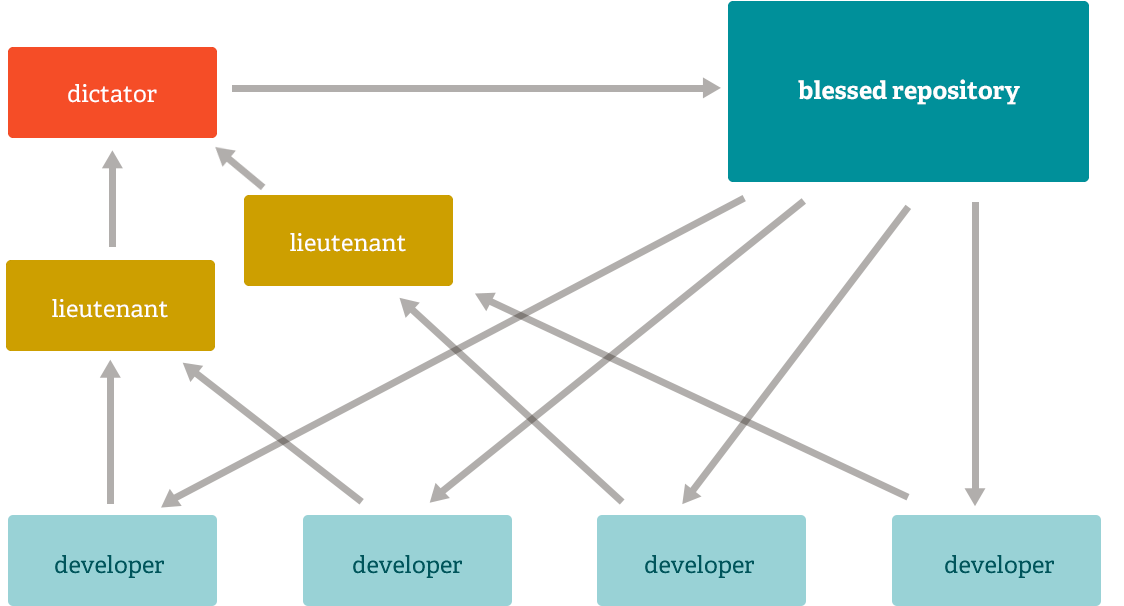
It’s about the workflows, or the ways we socially use the tool.
Subversion Workflow
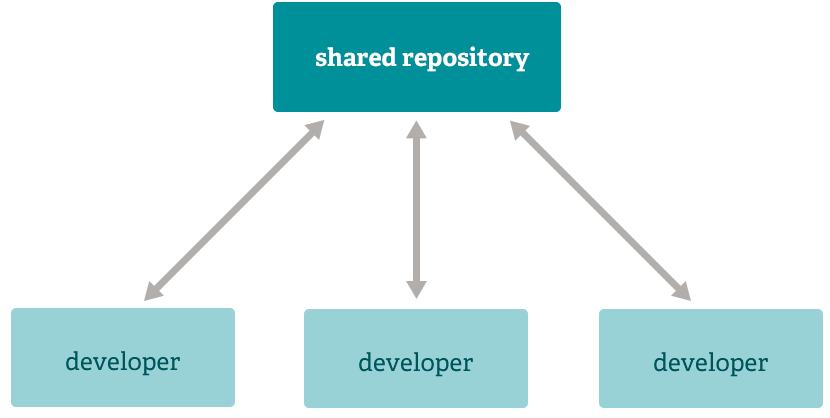
subversion is an older VCS
Integration Manager
dictator and lieutenants
How does git do all these things?
Let’s look at git again in our github-inclass repo
cd ../gh-inclass-fa25-brownsarahm/ls .git/COMMIT_EDITMSG hooks ORIG_HEAD
config index packed-refs
description info REBASE_HEAD
FETCH_HEAD logs refs
HEAD objectsWe can use the bash command find to search the file system note that this does not search the contents of the files, just the names.
find .git/objects/ -type f.git/objects/6f/435051d686c4fec112cdfe7c73c65ad9153125
.git/objects/9e/ce5efa25710c8fad7d9f210928785b5362b06f
.git/objects/3c/7ace1d193b78129c10d61609cbe97b2686f202
.git/objects/0b/27ed97affe4f84fa39a869a971393158df9614
.git/objects/93/c08483f44ebdf5ce10e6c0002e641aa0cc8844
.git/objects/33/00996de3e91ced5c731d759d29a10f011aeb00
.git/objects/9d/6ffa6ded47d8b6df13ed60e482b188015ee499
.git/objects/a4/df42ba0c80164337e9b643cedf81bdf0bfed06
.git/objects/da/16bedd26719bebbd410be1ce7e798db3906ca1
.git/objects/d6/36b59de6f684efb5ac59e735ddf8b598e0a1a1
.git/objects/bc/89cfcd3f35fd1052b707a43e65aa06e9dc087f
.git/objects/d8/7bf4a5641e0429fd3c371bd2b19d755105ca92
.git/objects/ab/e403c82238c3877b3437c1ab3e32499a60e24f
.git/objects/c1/b4f81358eaaf467ff4ce4b95171497c28d1622
.git/objects/18/28598c676242bd80f230aa122226d34030d385
.git/objects/pack/pack-13d4c9a19caacca644b065177eba0c4ebc229de9.idx
.git/objects/pack/pack-13d4c9a19caacca644b065177eba0c4ebc229de9.pack
.git/objects/pack/pack-13d4c9a19caacca644b065177eba0c4ebc229de9.rev
.git/objects/11/017a59088d4a0b880f770f15fab8c9e086a789
.git/objects/1f/6ef3acccb91bc0c33661854903ec5e7d666fb5
.git/objects/74/3db376fa76bb3611cfac6935938d179330c7eb
.git/objects/28/5dd2104498d173d1926fb59f5513d224a34a14
.git/objects/19/e9a4e91197294600869263508df42d46328d5c
.git/objects/19/9eea35c4ed2842d2685d9ba4c1e1fb48c6c9cb
.git/objects/21/6b5d4d8a7630626ce0e7997aa89678d340d680
.git/objects/3a/4533a3abbc749f5e1905b30eb187a7350ae71a
.git/objects/37/d36fa247c105aa79db73462d339328282d7dbd
.git/objects/39/d5708913a6c708d1a505cde6da544785c086a6
.git/objects/99/f86bf7112debc934e7fa4504232a48266d90e4
.git/objects/63/063aaa7d1dad782e0349d897fcf33ff16a7e5d
.git/objects/63/4c2175bf0b39883b5e8dcc1fae0d2b45c770b3
.git/objects/d3/980efccf4856f0c61a6a16ed40be534c5230a5
.git/objects/b6/8b274889484df662f75334a49aff24d74329b9
.git/objects/b6/900699673b2613e2456a50b3b26e297dafb02c
.git/objects/b0/20e21272ba05cff974b1f789bdf5cfd2f5d355
.git/objects/c4/29050b554c3d504dc964b32f59affcf28f6435
.git/objects/cc/627365016fb88ed37beaea453e699ddc54d301
.git/objects/f9/e70e5b8173525188a6b10ce5979972de4e0d9f
.git/objects/e8/99a0e7ad5a9626a6d5c6b0fd96a410bd42b710
.git/objects/ce/fef180a1dee7ac5511a40875ce36aae3e22aff
.git/objects/e0/f340c90f46a0103ee3dac9cfdc5520e4848731
.git/objects/2d/232a2231c650dc4094606797fe0bd3e0ce4c65
.git/objects/48/70a077addb5bf3da72fdbd4180d5484dde4e75
.git/objects/1e/97f0d64fc62f40bbeb0eba19fa696fe47b7ccc
.git/objects/4f/8c7533ddc99e6a12a26fe1802d40e8e3c78f4b
.git/objects/76/2f01b5cf84f39096d55ca95e46f0519d8cae48
.git/objects/82/893b5a04aee05782394678373add23a35e1887
.git/objects/49/d6982b5f411764b330c03be5faed0d60610ca3This is a lot of files! It’s more than we have in our working directory.
This is a consequence of git taking snap shots and tracking both the actual contents of our working directory and our commit messages and other meta data about each commit.
Git Variables
the program git does not run continously the entire time you are using it for a project. It runs quick commands each time you tell it to, it’s goal is to manage files, so this makes sense. This also means that important information that git needs is also saved in files.
We can see the files that it has by listing the directory:
ls .gitCOMMIT_EDITMSG hooks ORIG_HEAD
config index packed-refs
description info REBASE_HEAD
FETCH_HEAD logs refs
HEAD objectsthe files in all caps are like gits variables.
HEAD
Lets look at the one called HEAD we have interacted with HEAD before when resolving merge conflicts.
cat .git/HEADref: refs/heads/organizationHEAD is a pointer to the currently checked out branch.
The other files with HEAD in their name are similarly pointers to other references, named corresponding to other things.
so, if we switch branches
git checkout mainSwitched to branch 'main'
Your branch is up to date with 'origin/main'.Then we look at HEAD again:
cat .git/HEADref: refs/heads/mainnow it points to main
Branches are like pointers
I have said this before and we hav used it conceptuall, but now we can see this as it implemented
above, we looked at the value of the HEAD file.
ref: refs/heads/mainIt tells us that the HEAD is currently a ref, which branches are one type of. Specifically branches are stored in the refs/heads folder.
Now we can look at what is in that file
cat .git/refs/heads/mainthat file contains the hash of the last commit on that branch:
11017a59088d4a0b880f770f15fab8c9e086a789We can do the same for another branch:
cat refs/heads/organizationagain, the hash of the last commit on that branch
e899a0e7ad5a9626a6d5c6b0fd96a410bd42b710We can verify this with git log:
git log1 2 3 4 5 6 7 8 9 10 11 12 13 14 15 16 17 18 19 20 21 22 23 24 25 26commit e899a0e7ad5a9626a6d5c6b0fd96a410bd42b710 (HEAD -> organization, origin/organization) Author: Sarah M Brown <brownsarahm@uri.edu> Date: Thu Sep 18 13:38:47 2025 -0400 begin reorg commit 285dd2104498d173d1926fb59f5513d224a34a14 Author: Sarah M Brown <brownsarahm@uri.edu> Date: Thu Sep 18 13:04:26 2025 -0400 add note to readme commit 3300996de3e91ced5c731d759d29a10f011aeb00 (origin/organizing_ac, organizing_ac) Author: Sarah M Brown <brownsarahm@uri.edu> Date: Thu Sep 18 12:34:06 2025 -0400 add files for organizing activity commit 11017a59088d4a0b880f770f15fab8c9e086a789 (origin/main, origin/HEAD, mybranchcheckedoutb, my_branch, main) Merge: c8f4926 99f86bf Author: Sarah Brown <brownsarahm@uri.edu> Date: Tue Sep 16 19:51:36 2025 +0300 Merge pull request #2 from compsys-progtools/1-add-a-readme create a readme closes #1
What happens when we checkout a branch?
First it sets the HEAD to point to that branch, then it traces to the commit that branch points to.
Recall, from a commit object we can see the contents:
git cat-file -p 11011 2 3 4 5 6 7 8 9 10 11 12 13 14 15 16 17 18 19 20 21 22 23 24 25 26tree d636b59de6f684efb5ac59e735ddf8b598e0a1a1 parent c8f4926313ba8f6c5bfad3857b7479a666328e6d parent 99f86bf7112debc934e7fa4504232a48266d90e4 author Sarah Brown <brownsarahm@uri.edu> 1758041496 +0300 committer GitHub <noreply@github.com> 1758041496 +0300 gpgsig -----BEGIN PGP SIGNATURE----- wsFcBAABCAAQBQJoyZWYCRC1aQ7uu5UhlAAAj5YQAJH2rVfKYEjz4P5H12xBnWhh k2W5GKBWHRnuzdmB6Tmm6yjkvRPWgjZ1qRgl4UIRRGWBa5sQcZVMscmAinxd3+q8 L1jqQjjyuOy9FeCDEQ9yLrrF6rzYTdBRZvlNWTFyns1aZrj1JT8e+IpLSuMJhJc5 dH44dhvTi6fE5gIyCgFlRK7CuuuKAuxn3/evtXSMAf25u1cWq8Htl18gGWHj7vWI aXqA8EAGrcGz5b2u+cDSdnUoUTQZHaSC2L4W4Kpe3WS9sohWpc8xEl+hPbSOmYgB TdSY1QhZL2MVap0sOJ0lI/f2fWz/4U0toapX6yX4ZifffqZIESMo8v2/ZYqemdaV ghw/elalahbUfnRUTJag5m3OxClq5VImZ/9T1zgOwLQq+nwQ90yudcxGji9dHb68 TPSxLbbUlcGnA5VtBoPx+qG4PFtLjS1dhADQki1cmUZBn+fex5bR+iWlOlxjXfXP IDWXr0S4XIbn8uRrEimiN2XxpUap5ZOEsBTKEUM1Lckijrs3H3FfvJHW49drcCgO Vba8zRonImBU24EeTfdCvgYFz8Jfjow5lMyOmQZHtDNGJ1+OGqN7h+GKDazuXqoz Zs8Dy+zOOlKwbMnMvgUS/FU3kV17dxI76P46gvIJlazPJuGN2b5lAXTAECGY9tni xx+nH+Z0/HrBdNeFCi0C =9yM8 -----END PGP SIGNATURE----- Merge pull request #2 from compsys-progtools/1-add-a-readme create a readme closes #1
From that commit, it picks out the tree object (see higlighted line in the above)
git cat-file -p d636b040000 tree 263fb9d22090e88edd2bf1847c24c3511de91b49 .github
100644 blob bc89cfcd3f35fd1052b707a43e65aa06e9dc087f README.mdThen, for each blob it reads the content of that blob object and writes the content to a file names as is.
So in this exmaple, mine takes the content from blob bc89cf uncompresses it and writes it to README.me
And does the same process for each tree recursively until done.
Since the tree above is for the latest commit on the branch that is currently checked out, if I use ls to view the workign directory it will match:
ls -a. .git .secret
.. .github README.mdup to a few exceptions:
., and..are special and everywhere, so they don’t count.the
.gitdirectory is not snapshotted, it holds the snapshots`on the
organizationbranch we ignored the.secretfile so it is still in the repo from that branch, because git does not modify it when we switch, though it is not protected on the main branch yet (there is no .gitignore file here) so we need to be careful
and if we look at the hash of the blob for the README file:
git cat-file -p bc89# GitHub practice
testand compare it to the current file contents
cat README.md# GitHub practice
testthose also match
If we switch branches again, we can go through the steps again and see:
git checkout organizationSwitched to branch 'organization'
Your branch is up to date with 'origin/organization'.then check the HEAD:
cat .git/HEADref: refs/heads/organizationand the branch file
cat .git/refs/heads/organizatione899a0e7ad5a9626a6d5c6b0fd96a410bd42b710then that commit
git cat-file -p e899tree 6f435051d686c4fec112cdfe7c73c65ad9153125
parent 285dd2104498d173d1926fb59f5513d224a34a14
author Sarah M Brown <brownsarahm@uri.edu> 1758217127 -0400
committer Sarah M Brown <brownsarahm@uri.edu> 1758217127 -0400
begin reorgand the tree for that
git cat-file -p 6f43040000 tree 263fb9d22090e88edd2bf1847c24c3511de91b49 .github
100644 blob c1b4f81358eaaf467ff4ce4b95171497c28d1622 .gitignore
100644 blob 3a4533a3abbc749f5e1905b30eb187a7350ae71a API.md
100644 blob 9ece5efa25710c8fad7d9f210928785b5362b06f CONTRIBUTING.md
100644 blob 2d232a2231c650dc4094606797fe0bd3e0ce4c65 LICENSE.md
100644 blob 19e9a4e91197294600869263508df42d46328d5c README.md
100644 blob 9d6ffa6ded47d8b6df13ed60e482b188015ee499 abstract_base_class.py
100644 blob 762f01b5cf84f39096d55ca95e46f0519d8cae48 alternative_classes.py
040000 tree 743db376fa76bb3611cfac6935938d179330c7eb docs
100644 blob 93c08483f44ebdf5ce10e6c0002e641aa0cc8844 example.md
100644 blob f9e70e5b8173525188a6b10ce5979972de4e0d9f helper_functions.py
100644 blob 762f01b5cf84f39096d55ca95e46f0519d8cae48 important_classes.py
100644 blob d87bf4a5641e0429fd3c371bd2b19d755105ca92 scratch.ipynb
100644 blob 39d5708913a6c708d1a505cde6da544785c086a6 setup.py
040000 tree d3980efccf4856f0c61a6a16ed40be534c5230a5 testsand if we for example, pick the README again
git cat-file -p 19e9# GitHub practice
test
today is rainy
|file | contents |
> | --| -- |
> | abstract_base_class.py | core abstract classes for the project |
> | helper_functions.py | utitly funtions that are called by many classes |
> | important_classes.py | classes that inherit from the abc |
> | alternative_classes.py | classes that inherit from the abc |
> | LICENSE.md | the info on how the code can be reused|
> | CONTRIBUTING.md | instructions for how people can contribute to the project|
> | setup.py | file with function with instructions for pip |
> | test_abc.py | tests for constructors and methods in abstract_base_class.py|
> | tests_helpers.py | tests for constructors and methods in helper_functions.py|
> | tests_imp.py | tests for constructors and methods in important_classes.py|
> | tests_alt.py | tests for constructors and methods in alternative_classes.py|
> | API.md | jupyterbook file to generate api documentation |
> | _config.yml | jupyterbook config for documentation |
> | _toc.yml | jupyter book toc file for documentation |
> | philosophy.md | overview of how the code is organized for docs |
> | example.md | myst notebook example of using the code |
> | scratch.ipynb | jupyter notebook from dev |and compare to the working directory
cat README.md# GitHub practice
test
today is rainy
|file | contents |
> | --| -- |
> | abstract_base_class.py | core abstract classes for the project |
> | helper_functions.py | utitly funtions that are called by many classes |
> | important_classes.py | classes that inherit from the abc |
> | alternative_classes.py | classes that inherit from the abc |
> | LICENSE.md | the info on how the code can be reused|
> | CONTRIBUTING.md | instructions for how people can contribute to the project|
> | setup.py | file with function with instructions for pip |
> | test_abc.py | tests for constructors and methods in abstract_base_class.py|
> | tests_helpers.py | tests for constructors and methods in helper_functions.py|
> | tests_imp.py | tests for constructors and methods in important_classes.py|
> | tests_alt.py | tests for constructors and methods in alternative_classes.py|
> | API.md | jupyterbook file to generate api documentation |
> | _config.yml | jupyterbook config for documentation |
> | _toc.yml | jupyter book toc file for documentation |
> | philosophy.md | overview of how the code is organized for docs |
> | example.md | myst notebook example of using the code |
> | scratch.ipynb | jupyter notebook from dev |Other variables
ls .gitCOMMIT_EDITMSG HEAD logs REBASE_HEAD
config hooks objects refs
description index ORIG_HEAD
FETCH_HEAD info packed-refsORIG_HEAD is the pointer to where your local git repo knows last the head of the origin remote was (here, GitHub)
cat .git/ORIG_HEAD634c2175bf0b39883b5e8dcc1fae0d2b45c770b3Git Objects
There are 3[1] types:
blob objects: the content of your files (data)
tree objects: stores file names and groups files together (organization)
Commit Objects: stores information about the sha values of the snapshots
Some variables are only created when you need them or use them
For example if we compare the gh-inclass
ls .gitCOMMIT_EDITMSG HEAD logs REBASE_HEAD
config hooks objects refs
description index ORIG_HEAD
FETCH_HEAD info packed-refsto my kwl
cd ../fall25-kwl-brownsarahm/ls .gitconfig HEAD info packed-refs
description hooks logs refs
FETCH_HEAD index objectswe see some are not there
the COMMIT_EDITMSG was created when we ran git commit without the -m option
cat .git/COMMIT_EDITMSGbegin reorgCommits are Immutable
A commit is created by:
making blobs for every file (including in folders) in the staging area
making trees for every folder
formatting the commit file content (parent commit hash, tree hash, author, time, message)
hashing that content
writing the content to a file named with the hash value
therefore, if we change anything about the content, it gets a new hash, and makes a new commit. In other words,a commit is an Immutable object
This means that git is secure in the sense that no malicious actor could infect a repo.
If the content of a fil for a git object (blob, tree, or commit) does not hash to the name of the file, we can tell that it is tampered with.
see more on the data assurance
Prepare for Next Class
If on windows, you may need to reinstall gitbash or follow other steps from the gh docs mintty page for the following steps to work locally
install jupyterbook this is not the same as
jupyter laborjupyter notebookthat 310 usesMake sure that the
ghCLI tool works by using it to create an issue called test on your kwl repo withgh issue create. If on Windows try reinstalling with minttyPost an example of documentation for libraries, frameworks, or developer tools that you have used and make a post on the class discussion board. Refresh your memory of the one you post and skim through two other examples.
Badges
Review the notes from today
Read about different workflows in git and describe which one you prefer to work with and why in favorite_git_workflow.md in your kwl repo. Two good places to read from are Git Book and the atlassian Docs
Update your kwl chart with what you have learned or new questions in the want to know column
In commit_contents.md, redirect the content of your most recent commit to your kwl repo, its tree, and the contents of one blob. Edit the file or use
echoto put markdown headings between the different objects. Add a title# Complete Committo the file and at the bottom of the file add## Reflectionsubheading with some notes on how, if at all this excercise helps you understand how git works.
Review the notes from today
Read about different workflows in git and add responses to the below in a workflows.md in your kwl repo. Two good places to read from are Git Book and the atlassian Docs
Update your kwl chart with what you have learned or new questions in the want to know column
Find the hash of the content of your completed workflows.md file and put that in the comment of your badge PR for this badge. Try to do this from your local CLI, but full credit even if you use the website interface
## Workflow Reflection

1. Why is it important that git can be used with different workflows?
1. Which workflow do you think you would like to work with best and why?
1. Describe a scenario that might make it better for the whole team to use a workflow other than the one you prefer.
Experience Report Evidence
Append the contents of one of your trees or commits and one blob or tree inside of that first one to the bottom of your experience report.
That is, paste the result of you tracing through your own repo.
Questions After Today’s Class
How will we apply this information to the course?
Today we saw an example of how abstractions can work (or not quite work, since git is a leaky abstraction).
Seeing how git works as a file system also starts to build up your knowledge of what kinds of operations any file system needs to implement
Is there a benefit to working with git at a lower level?
It is mostly helpful for understanding how git works so that you can understand how the more advanced features work, which can save you a lot of time.
We studied it primarily to see how a file system works.
It could, however, be useful if you were building a developer tool, or you wanted to contribute to git itself see gitgitgadget for how
Is it possible to check the oldest commit using cat .git/HEAD
You coudl trace backwards, like parsing through a linked list:
first
cat .git/HEADthen
catthe file that tells you aboutthen use
git cat-file -pon the hash from the file abovethen use
git cat-file -phash of the parent commitrepeat above until there is no parent commit.
Can we configure Git to use a stronger hashing algorithm?
It looks like you can actually, from the transition plan’s detailed design that they have implemented it. However, it appears github does not support that, but gitlab does at least partially
If we are seeing a command for the first time, how do we know if it is porcelain or plumbing?
You can use the definitions and what the command does.