Today we are going to pick up from where we left off talking about the conventional commits.
That is a core example of the types of detailed communication we do in programming that is embedded into the work.
Why Documentation
Today we will talk about documentation, there are several reasons this is important:
using official documentation is the best way to get better at the tools
understanding how documentation is designed and built will help you use it better
writing and maintaining documentation is really important part of working on a team
even if you use an LLM to help improve the writing, a human must verify the actual facts
documentation building tools are a type of developer tool (and these are generally good software design)
documentation building tools can help produce other types of writing in more developer-centric ways (nice automation of tedious things, etc)
Design is best learned from examples. Some of the best examples of software design come from developer tools.
In particular documentation tools are really good examples of:
pattern matching
modularity and abstraction
automation
the build process beyond compiling
By the end of today’s class you will be able to:
describe different types of documentation
find different information in a code repo
generate documentation as html
create a repo locally and push to GitHub
Plus we will reinforce things we have already seen:
ignoring content from a repo
paths
good file naming
What is documentation
We looked at a documentation types table from an article ethnography of documentation data science
Why is documentation so important?
we should probably spend more time on it
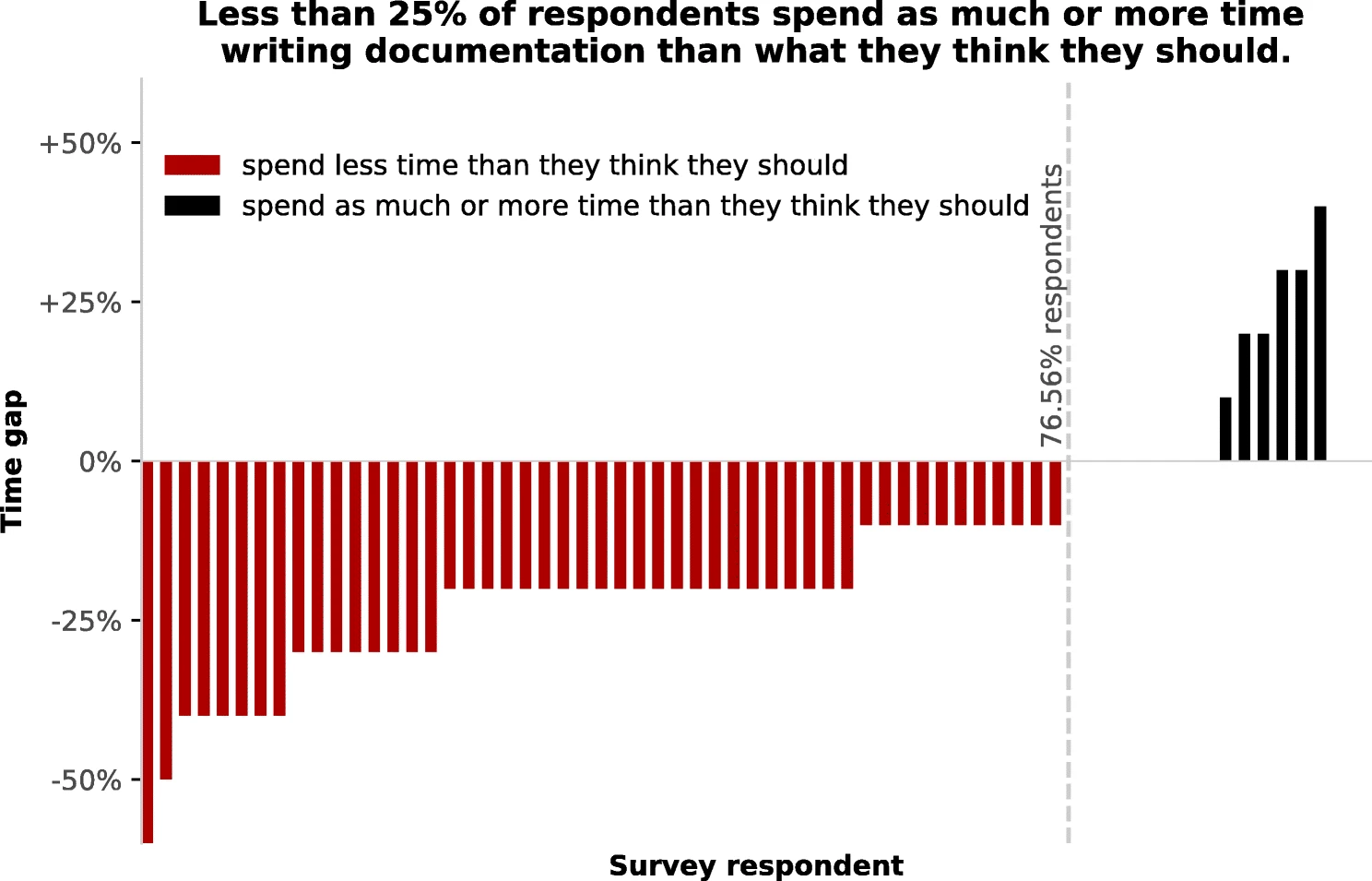
So, how do we do it?
Different types of documentation live in different places and we use tools to maintain them.
As developers, we rely on code to do things that are easy for computers and hard for people.
You can read a list of documentation tools built by the researchers at UC Berkeley who hosted a docathon, week long hackathon to help people get better at building documentation for the tools they used and built.
The site shows different tools for many different languages and a short description of many of the top tools.
There is even a whole community and site just for documentation: write the docs
Jupyterbook
We’re going to use Jupyterbook v1. Jupyterber v1 wraps a tool called sphinx and uses myst markdown instead of reStructuredText. The project authors note in the documenation that it “can be thought of as an opinionated distribution of Sphinx”.
sphinx is a very popular tool so knowing how it works is a general advantage. reStructuredText is not hard to learn, but I did not want to spend time on that, so we’re using markdown to keep it simple, and to demonstrate that these tools are extensible.
Even the linux kernel uses sphinx and here is why and how it works
navigate to your folder for this course (mine is inclass/systems)
We can confirm that jupyter-book is installed by checking the version.
jupyter-book --versionJupyter Book : 1.0.4.post1
External ToC : 1.0.1
MyST-Parser : 3.0.1
MyST-NB : 1.3.0
Sphinx Book Theme : 1.1.4
Jupyter-Cache : 1.0.1
NbClient : 0.10.2We will run a command to create a jupyterbook from a template:
jupyter-book create tiny-bookthe command has 3 parts:
===============================================================================

Your book template can be found at

    tiny-book/

===============================================================================we can verify the output by looking
lsfall25-kwl-brownsarahm tiny-book
gh-inclass-fa25-brownsarahmbecause the name is an argument or input, you can make it with any name:
jupyter-book create example===============================================================================
Your book template can be found at
example/
===============================================================================Each one makes a directory, we can see by listing
lsexample gh-inclass-fa25-brownsarahm
fall25-kwl-brownsarahm tiny-bookAnd we can delete the second one since we do not actually want it.
rm example/rm: example/: is a directorywe get an error because it is not well defined to delete a directory, and potentially risky, so rm is written to throw an error
Instead, we have to tell it two additional things:
to delete recusively
rto force it to do something risky with
f
note we can stack single character options together with a single -
rm -rf example/then we verify that it worked
lsfall25-kwl-brownsarahm tiny-book
gh-inclass-fa25-brownsarahmNow, let’s move inside the new folder
cd tiny-book/and look at what is there
ls -a_config.yml intro.md notebooks.ipynb
_toc.yml logo.png references.bib
. markdown-notebooks.md requirements.txt
.. markdown.mdStarting a git repo locally
We made this folder, but we have not used any git operations on it yet, it is actually not a git repo, which we could tell from the output above, but let’s use git to inspect and get another hint.
We can try git status
git statusfatal: not a git repository (or any of the parent directories): .gitThis tells us the .git directory is missing form the current path and all parent directories.
To make it a git repo we use git init with the path we want to initialize, which currently is .
git init .hint: Using 'master' as the name for the initial branch. This default branch name
hint: is subject to change. To configure the initial branch name to use in all
hint: of your new repositories, which will suppress this warning, call:
hint:
hint: git config --global init.defaultBranch <name>
hint:
hint: Names commonly chosen instead of 'master' are 'main', 'trunk' and
hint: 'development'. The just-created branch can be renamed via this command:
hint:
hint: git branch -m <name>
Initialized empty Git repository in /Users/brownsarahm/Documents/inclass/systems/tiny-book/.git/We want to use up to date, inclusive terminology, and we have already been using main for the default branch so far so let’s do that again:
git branch -m mainand check in with git now
git statusOn branch main
No commits yet
Untracked files:
(use "git add <file>..." to include in what will be committed)
_config.yml
_toc.yml
intro.md
logo.png
markdown-notebooks.md
markdown.md
notebooks.ipynb
references.bib
requirements.txt
nothing added to commit but untracked files present (use "git add" to track)We have to add separately because the files are untracked we cannot use the -a option on commit
git add .and then we will commit with a simple message
git commit -m 'jupyter book template'[main (root-commit) e875d64] jupyter book template
9 files changed, 341 insertions(+)
create mode 100644 _config.yml
create mode 100644 _toc.yml
create mode 100644 intro.md
create mode 100644 logo.png
create mode 100644 markdown-notebooks.md
create mode 100644 markdown.md
create mode 100644 notebooks.ipynb
create mode 100644 references.bib
create mode 100644 requirements.txtStructure of a Jupyter book
We will explore the output by looking at the files
ls_config.yml logo.png notebooks.ipynb
_toc.yml markdown-notebooks.md references.bib
intro.md markdown.md requirements.txtA jupyter book has two required files (_config.yml and _toc.yml), some for content, and some helpers that are common but not required.
the
*.mdfiles are contentthe
.bibfile is bibiolography informationThe other files are optional, but common. Requirements.txt is the format for pip to install python depndencies. There are different standards in other languages for how
Dev tools mean we do not have to write bibliographies manually
bibliographies are generated with bibtex which takes structured information from the references in a bibtex file with help from sphinxcontrib
For general reference, reference managers like zotero and mendeley can track all of your sources and output the references in bibtex format that you can use anywhere or sync with tools like MS Word or Google Docs.
cat _config.ymlThe configuration file, tells jupyter-book basic iformation about the book, it provides all of the settings that jupyterbook and sphinx need to render the content as whatever output format we want.
1 2 3 4 5 6 7 8 9 10 11 12 13 14 15 16 17 18 19 20 21 22 23 24 25 26 27 28 29 30 31 32# Book settings # Learn more at https://jupyterbook.org/customize/config.html title: My sample book author: The Jupyter Book Community logo: logo.png # Force re-execution of notebooks on each build. # See https://jupyterbook.org/content/execute.html execute: execute_notebooks: force # Define the name of the latex output file for PDF builds latex: latex_documents: targetname: book.tex # Add a bibtex file so that we can create citations bibtex_bibfiles: - references.bib # Information about where the book exists on the web repository: url: https://github.com/executablebooks/jupyter-book # Online location of your book path_to_book: docs # Optional path to your book, relative to the repository root branch: master # Which branch of the repository should be used when creating links (optional) # Add GitHub buttons to your book # See https://jupyterbook.org/customize/config.html#add-a-link-to-your-repository html: use_issues_button: true use_repository_button: true
The table of contents file describe how to put the other files in order.
cat _toc.yml1 2 3 4 5 6 7 8 9# Table of contents # Learn more at https://jupyterbook.org/customize/toc.html format: jb-book root: intro chapters: - file: markdown - file: notebooks - file: markdown-notebooks
The one last file tells us what dependencies we have
cat requirements.txtIf your book generates with error messages run pip install -r requirements.txt
Building Documentation
We can transform from raw source to an output by building the book
jupyter-book build .Running Jupyter-Book v1.0.4.post1
Source Folder: /Users/brownsarahm/Documents/inclass/systems/tiny-book
Config Path: /Users/brownsarahm/Documents/inclass/systems/tiny-book/_config.yml
Output Path: /Users/brownsarahm/Documents/inclass/systems/tiny-book/_build/html
Running Sphinx v7.4.7
loading translations [en]... done
making output directory... done
[etoc] Changing master_doc to 'intro'
checking bibtex cache... out of date
parsing bibtex file /Users/brownsarahm/Documents/inclass/systems/tiny-book/references.bib... parsed 5 entries
myst v3.0.1: MdParserConfig(commonmark_only=False, gfm_only=False, enable_extensions={'colon_fence', 'linkify', 'substitution', 'tasklist', 'dollarmath'}, disable_syntax=[], all_links_external=False, links_external_new_tab=False, url_schemes=('mailto', 'http', 'https'), ref_domains=None, fence_as_directive=set(), number_code_blocks=[], title_to_header=False, heading_anchors=0, heading_slug_func=None, html_meta={}, footnote_transition=True, words_per_minute=200, substitutions={}, linkify_fuzzy_links=True, dmath_allow_labels=True, dmath_allow_space=True, dmath_allow_digits=True, dmath_double_inline=False, update_mathjax=True, mathjax_classes='tex2jax_process|mathjax_process|math|output_area', enable_checkboxes=False, suppress_warnings=[], highlight_code_blocks=True)
myst-nb v1.3.0: NbParserConfig(custom_formats={}, metadata_key='mystnb', cell_metadata_key='mystnb', kernel_rgx_aliases={}, eval_name_regex='^[a-zA-Z_][a-zA-Z0-9_]*$', execution_mode='force', execution_cache_path='', execution_excludepatterns=[], execution_timeout=30, execution_in_temp=False, execution_allow_errors=False, execution_raise_on_error=False, execution_show_tb=False, merge_streams=False, render_plugin='default', remove_code_source=False, remove_code_outputs=False, scroll_outputs=False, code_prompt_show='Show code cell {type}', code_prompt_hide='Hide code cell {type}', number_source_lines=False, output_stderr='show', render_text_lexer='myst-ansi', render_error_lexer='ipythontb', render_image_options={}, render_figure_options={}, render_markdown_format='commonmark', output_folder='build', append_css=True, metadata_to_fm=False)
Using jupyter-cache at: /Users/brownsarahm/Documents/inclass/systems/tiny-book/_build/.jupyter_cache
sphinx-multitoc-numbering v0.1.3: Loaded
building [mo]: targets for 0 po files that are out of date
writing output...
building [html]: targets for 4 source files that are out of date
updating environment: [new config] 4 added, 0 changed, 0 removed
/Users/brownsarahm/Documents/inclass/systems/tiny-book/markdown-notebooks.md: Executing notebook using local CWD [mystnb]
/Users/brownsarahm/Documents/inclass/systems/tiny-book/markdown-notebooks.md: Executed notebook in 0.64 seconds [mystnb]
/Users/brownsarahm/Documents/inclass/systems/tiny-book/notebooks.ipynb: Executing notebook using local CWD [mystnb]
/Users/brownsarahm/Documents/inclass/systems/tiny-book/notebooks.ipynb: WARNING: Executing notebook failed: CellExecutionError [mystnb.exec]
/Users/brownsarahm/Documents/inclass/systems/tiny-book/notebooks.ipynb: WARNING: Notebook exception traceback saved in: /Users/brownsarahm/Documents/inclass/systems/tiny-book/_build/html/reports/notebooks.err.log [mystnb.exec]
looking for now-outdated files... none found
pickling environment... done
checking consistency... done
preparing documents... done
copying assets...
copying static files... done
copying extra files... done
copying assets: done
writing output... [100%] notebooks
generating indices... genindex done
writing additional pages... search done
dumping search index in English (code: en)... done
dumping object inventory... done
[etoc] missing index.html written as redirect to 'intro.html'
build succeeded, 2 warnings.
The HTML pages are in _build/html.
===============================================================================
Finished generating HTML for book.
Your book's HTML pages are here:
_build/html/
You can look at your book by opening this file in a browser:
_build/html/index.html
Or paste this line directly into your browser bar:
file:///Users/brownsarahm/Documents/inclass/systems/tiny-book/_build/html/index.html
===============================================================================Now we can look at what it did
ls_build logo.png references.bib
_config.yml markdown-notebooks.md requirements.txt
_toc.yml markdown.md
intro.md notebooks.ipynbwe note that this made a new folder called _build. we can look inside there.
ls _build/html jupyter_executeand in the html folder:
ls _build/html/_sources intro.html reports
_sphinx_design_static markdown-notebooks.html search.html
_static markdown.html searchindex.js
genindex.html notebooks.html
index.html objects.invIf you wanted to change the styling with sphinx you can use built in
themes which tell sphinx to put different
files in the _static folder when it builds your site, but you don’t have to change any of your content! If you like working on front end things (which is great! it’s just not alwasy the goal) you can even
build your own theme that can work with sphinx.
cat requirements.txtjupyter-book
matplotlib
numpyHandling Built files
The built site files are compeltey redundant, content wise, to the original markdown files.
We do not want to keep track of changes for the built files since they are generated from the source files. It’s redundant and makes it less clear where someone should update content.
git statusOn branch main
Untracked files:
(use "git add <file>..." to include in what will be committed)
_build/
nothing added to commit but untracked files present (use "git add" to track)Git helps us with this with the .gitignore
echo "_build" >> .gitignoregit statusOn branch main
Untracked files:
(use "git add <file>..." to include in what will be committed)
.gitignore
nothing added to commit but untracked files present (use "git add" to track)only the gitingore file itself is listed! just as we want.
now that’s the only new file as far as git is concerned, so we will track this,
git add .and finally commit
git commit -m 'ignore build'[main 628eac6] ignore build
1 file changed, 1 insertion(+)
create mode 100644 .gitignoreand check the status againg
git statusOn branch main
nothing to commit, working tree cleanHow do I push a repo that I made locally to GitHub?
Right now, we do not have any remotes, so if we try to push it will fail. Next we will see how to fix that.
First let’s confirm
git pushfatal: No configured push destination.
Either specify the URL from the command-line or configure a remote repository using
git remote add <name> <url>
and then push using the remote name
git push <name>and it tells us how to fix it. This is why inspection is so powerful in developer tools, that is where we developers give one another hints.
Right now, we do not have any remotes
git remoteFor today, we will create a repo shared with me, by creating an empty repo owned by the course organization, named tiny-book-GHUSERNAME with GHUSERNAME replaced with your own username.
That default page for an empty repo if you do not initiate it with any files will give you the instructions for what remote to add.
Now we add the remote (by copying from the instructions)
git remote add origin https://github.com/compsys-progtools/tiny-book-brownsarahm1.gitpush still does not quite work
git pushfatal: The current branch main has no upstream branch.
To push the current branch and set the remote as upstream, use
git push --set-upstream origin main
To have this happen automatically for branches without a tracking
upstream, see 'push.autoSetupRemote' in 'git help config'.form the github instructions, we know that -u is the short version of --set-upstream:
git push -u origin mainEnumerating objects: 14, done.
Counting objects: 100% (14/14), done.
Delta compression using up to 16 threads
Compressing objects: 100% (12/12), done.
Writing objects: 100% (14/14), 16.45 KiB | 16.45 MiB/s, done.
Total 14 (delta 1), reused 0 (delta 0), pack-reused 0 (from 0)
remote: Resolving deltas: 100% (1/1), done.
To https://github.com/compsys-progtools/tiny-book-brownsarahm1.git
* [new branch] main -> main
branch 'main' set up to track 'origin/main'.Now we can see what it changed
git remoteoriginand review the config:
cat .git/config[core]
repositoryformatversion = 0
filemode = true
bare = false
logallrefupdates = true
ignorecase = true
precomposeunicode = true
[remote "origin"]
url = https://github.com/compsys-progtools/tiny-book-brownsarahm1.git
fetch = +refs/heads/*:refs/remotes/origin/*
[branch "main"]
remote = origin
merge = refs/heads/mainPrepare for Next Class
Create a file gitcommandsbreakdown.md and for each command in the template below break down what steps it must do based on what we have learned so far about git objects. I started the first one as an example. Next class, we will make a commit using plumbing commands, so thinking about what you already know about commits will prepare you to learn this material.
# What git commands do

## `git status`

- check the branch of the HEAD pointer
- compare the HEAD pointer to the FETCH_HEAD, if different trace back through parent commits to find out how many commits apart they are and which is ahead (or if both ahead and behind)
- compare the snapshot at the HEAD pointer's commit to the current working directory
- if staging is not empty, compare that to the working directory

## `git commit`

-

## `git add`

- Badges
Review the notes from today
Review the notes, jupyterbook docs, and experiment with the
jupyter-bookCLI to determine what files are required to makejupyter-book buildrun in your kwl repo. Make your kwl repo into a jupyter book, by manually adding those files. Do not add the whole template to your repo, make the content you have already so it can build into html. Set it so that the_builddirectory is not under version control.Add
docs.mdto your KWL repo and explain the most important things to know about documentation in your own words using other programming concepts you have learned so far. Include in a markdown (same as HTML<!-- comment -->) comment the list of CSC courses you have taken for context while we give you feedback.1. Review the notes from todayLearn about the documentation ecosystem in another language that you know using at least one official source and additional sources as you find helpful. In
docs.mdinclude a summary of your findings and compare and contrast it to jupyter book/sphinx. Include a bibtex based bibliography of the sources you used. You can use this generator for informal sources and google scholar for formal sources (or a reference manager).
Experience Report Evidence
Tiny book repo should exist. Append your terminal output or this repo’s git log to your experience report.
Questions After Today’s Class
How does bibtex generate bibliographies?
the bibtex file contains all of the information and then another build tool like jupyterbook, latex compiler, or mystmd processes it to produce the bibliography.
how does jupyter-book build documentation?
It parses the markdown to generate the html of the content and combines it with templates to make the complete website. Sphinx can also process the docstrings or other attributes in your code to generate documenation pages of the API or a CLI.
What are the downsides of jupyter-book?
It is focused on python and there are other documentation engines that have better support for other langauges.
It provides not quite as good of a reading experience as mystmd. To see this compare the features in the notes from this semester to past semesters.
If I delete a required folder in tiny-book, what would happen to the website?
There are no required folders, but if the required files are missing you get an error.
How much will we be using jupyter books in the class?
I recommend using them for build badges and they’re in today’s practice badge to conver your kwl repo.
Is there a cheatsheet for jupyter-book or just the documentation?
The documentation’s RESOURCES section has a cheatsheet for Myst-Markdown and a configuration reference which are what I use a lot.
can i use jupyter-book outside bash?
It is only a command line tool, but it is not shell specific
Why should the _build/ folder be ignored with .gitignore, and what problem could happen if you don’t?
Because it is not needed, we can re-generate it on demand.
If you don’t and then have a merge conflict, you would have twice as many (at least) merge conflicts to solve manually.
Also, it would make the repo take up a lot more space for no benefit.
What sorts of automation can be made between a repsitory and a Jupyter Book created website?
You can make a github action to automatically build the website and deploy it, see the previous semsters repositories and even this site’s repo has a gh action to deploy, but it is myst instead of jupyterbook.
What is the difference between Jupyter Book, Lab, and Notebook?
Jupyter Notebook is a single stream of computational analysis. Jupyter Lab is a more IDE like interface for doing compuational analyses. Both are part of project jupyter and on GitHub
Jupyter book is for publishing book like documents as websites and to other forms designed to be compatible with jupyter notebooks, but is a part of a separate executable books project. It is specialized for cases where there is computation in the code. See their gallery for examples. I use it for CSC310 that has code and plots in the notes
Is documentation a requirement when creating a programming language?
If you want people to be able to use your language then pretty much. That said, not all languages are open source and have easily accessbile, official documentation. Python, Rust, Asteroid (developed here at URI), Ruby and Stan among many others do. On the other hand the C++ language does not have any official documentation. There is a C++ standard that you can purchase, but no official documentation.
Can jupyterbook convert other languages to html or only python?
It doesn’t convert plain python to html, it can run jupyter notebooks. Jupyter notebooks can run many different kernels. Jupyter-book is an opinionated distribution of sphinx which can also be used to document other languages like C++
Should I use Jupyterbook for creating websites showcasing some of my programming projects?
You totally can. You could also use sphinx which is more customizable. A sphinx gallery might be of interest.
What happends to files in .gitignore once the repo is pushed?
Absolutely nothing. They exist in your working directory but they are not in the .git directory. These files are not tracked by git locally and not backed up by being copied to a server.
does jupyterbook have a hosting service or should we use something else like github pages?
Jupyterbook only provides the builder, but they do provide instructions for hosting with mulitple services.
sometimes commands within a program are called subcommands
- Geiger, R. S., Varoquaux, N., Mazel-Cabasse, C., & Holdgraf, C. (2018). The Types, Roles, and Practices of Documentation in Data Analytics Open Source Software Libraries. Computer Supported Cooperative Work (CSCW), 27(3–6), 767–802. 10.1007/s10606-018-9333-1
- Geiger, R. S., Varoquaux, N., Mazel-Cabasse, C., & Holdgraf, C. (2018). The Types, Roles, and Practices of Documentation in Data Analytics Open Source Software Libraries: A Collaborative Ethnography of Documentation Work. Computer Supported Cooperative Work (CSCW), 27(3–6), 767–802. 10.1007/s10606-018-9333-1