What are remote servers and HPC systems?
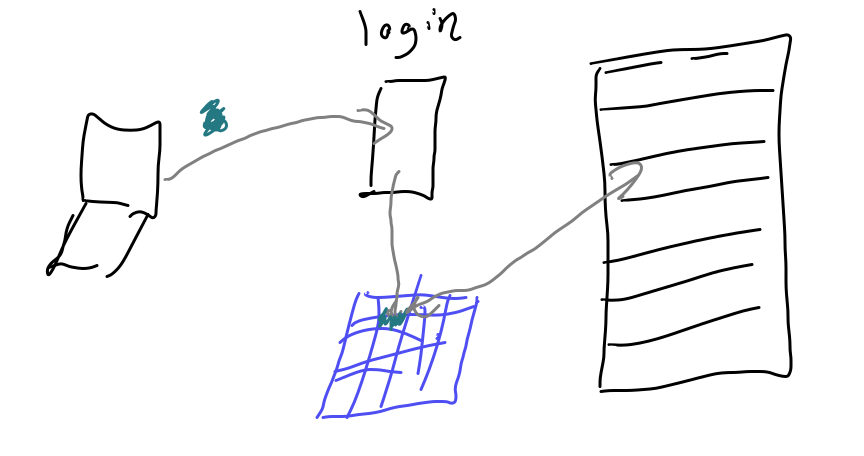
Connecting to Seawulf
We connect with secure shell or ssh from our terminal (GitBash or Putty on windows) to URI’s teaching High Performance Computing (HPC) Cluster Seawulf.
Our login is the part of your uri e-mail address before the @
ssh -l brownsarahm seawulf.uri.eduWhen it logs in it looks like this and requires you to change your password. They configure it with a default and with it past expired. Please note the command ssh -l, includes a lowercase “L” not the number 1!
The authenticity of host 'seawulf.uri.edu (131.128.217.210)' can't be established.
ECDSA key fingerprint is SHA256:RwhTUyjWLqwohXiRw+tYlTiJEbqX2n/drCpkIwQVCro.
Are you sure you want to continue connecting (yes/no/[fingerprint])? y
Please type 'yes', 'no' or the fingerprint: yes
Follow the instruction to type yes
I will tell you how to find your default password if you missed class (do not want to post it publicly). Comment on your experience report PR to ask for this information and @ mention me (brownsarahm).
Warning: Permanently added 'seawulf.uri.edu,131.128.217.210' (ECDSA) to the list of known hosts.
brownsarahm@seawulf.uri.edu's password:
It does not show charachters when you type your password, but it works when you press enter
Then it requires you to change your password
You are required to change your password immediately (root enforced)
WARNING: Your password has expired.
You must change your password now and login again!
To change, it asks for you current (default) password first,
Changing password for user brownsarahm.
Changing password for brownsarahm.
(current) UNIX password:
then the new one twice
New password:
Retype new password:
passwd: all authentication tokens updated successfully.
Connection to seawulf.uri.edu closed.
after you give it a new password, then it logs you out and you have to log back in.
We log in again with the same command:
ssh -l brownsarahm seawulf.uri.edubrownsarahm@seawulf.uri.edu's password:
Last login: Thu Oct 23 12:39:42 2025 from 172.20.24.214We can use bash commands. This is the most common shell, and remote servers where you typically cannot choose the shell are one of the most important reasons to learn a shell that is popular.
pwd/home/brownsarahmDownloading files
wget allows you to get files from the web.
wget http://www.hpc-carpentry.org/hpc-shell/files/bash-lesson.tar.gz--2025-10-23 12:46:51-- http://www.hpc-carpentry.org/hpc-shell/files/bash-lesson.tar.gz
Resolving www.hpc-carpentry.org (www.hpc-carpentry.org)... 172.64.80.1
Connecting to www.hpc-carpentry.org (www.hpc-carpentry.org)|172.64.80.1|:80... connected.
HTTP request sent, awaiting response... 200 OK
Length: 12534006 (12M) [application/gzip]
Saving to: ‘bash-lesson.tar.gz’
100%[=======================>] 12,534,006 19.8MB/s in 0.6s
2025-10-23 12:46:52 (19.8 MB/s) - ‘bash-lesson.tar.gz’ saved [12534006/12534006]Note that this is a reasonably sized download and it finished very quickly. This is because the download happened on the remote server not your laptop. The server has a high quality hard-wired connection to the internet that is very fast, unlike the wifi in our classroom.
This is an advantage of using a remote system. If your connection is slow, but stable enough to connect, you can do the work on a different computer that has better connection.
Now we see we have the file.
We can use ls with -l to see more information about the files.
ls -ltotal 113036
-rw-r--r--. 1 brownsarahm spring2022-csc392 12534006 Apr 18 2021 bash-lesson.tar.gzthe -h flag makes the file sizes more readable
ls -lhtotal 111M
-rw-r--r--. 1 brownsarahm spring2022-csc392 12M Apr 18 2021 bash-lesson.tar.gzthe file was 12MB and downloaded very fast! that is an advantage of using the remote server, your work is not impacted by slow wifi.
Unzipping a file on the command line
This file is compressed.
We can use man tar to see the manual aka man file of the tar program to learn how it works. You can also read man files online from GNU where you can choose your format, this page shows the full version.
tar -xvf bash-lesson.tar.gzThis command uses the tar program and:
vmakes it verbose (I have cut this output here)xmakes it extractfoption accepts the file name to work on
We can see what it did with ls
dmel-all-r6.19.gtf
dmel_unique_protein_isoforms_fb_2016_01.tsv
gene_association.fb
SRR307023_1.fastq
SRR307023_2.fastq
SRR307024_1.fastq
SRR307024_2.fastq
SRR307025_1.fastq
SRR307025_2.fastq
SRR307026_1.fastq
SRR307026_2.fastq
SRR307027_1.fastq
SRR307027_2.fastq
SRR307028_1.fastq
SRR307028_2.fastq
SRR307029_1.fastq
SRR307029_2.fastq
SRR307030_1.fastq
SRR307030_2.fastq
Note:
To extract files to a different directory use the option --directory
--directory path/to/directory
Working with large files
Today we will learn a few more bash commands.
let’s first look at the size of the files
ls -lhtotal 136M
-rw-r--r--. 1 brownsarahm spring2022-csc392 12M Apr 18 2021 bash-lesson.tar.gz
-rw-r--r--. 1 brownsarahm spring2022-csc392 74M Jan 16 2018 dmel-all-r6.19.gtf
-rw-r--r--. 1 brownsarahm spring2022-csc392 705K Jan 25 2016 dmel_unique_protein_isoforms_fb_2016_01.tsv
-rw-r--r--. 1 brownsarahm spring2022-csc392 24M Jan 25 2016 gene_association.fb
-rw-r--r--. 1 brownsarahm spring2022-csc392 1.6M Jan 25 2016 SRR307023_1.fastq
-rw-r--r--. 1 brownsarahm spring2022-csc392 1.6M Jan 25 2016 SRR307023_2.fastq
-rw-r--r--. 1 brownsarahm spring2022-csc392 1.6M Jan 25 2016 SRR307024_1.fastq
-rw-r--r--. 1 brownsarahm spring2022-csc392 1.6M Jan 25 2016 SRR307024_2.fastq
-rw-r--r--. 1 brownsarahm spring2022-csc392 1.6M Jan 25 2016 SRR307025_1.fastq
-rw-r--r--. 1 brownsarahm spring2022-csc392 1.6M Jan 25 2016 SRR307025_2.fastq
-rw-r--r--. 1 brownsarahm spring2022-csc392 1.6M Jan 25 2016 SRR307026_1.fastq
-rw-r--r--. 1 brownsarahm spring2022-csc392 1.6M Jan 25 2016 SRR307026_2.fastq
-rw-r--r--. 1 brownsarahm spring2022-csc392 1.6M Jan 25 2016 SRR307027_1.fastq
-rw-r--r--. 1 brownsarahm spring2022-csc392 1.6M Jan 25 2016 SRR307027_2.fastq
-rw-r--r--. 1 brownsarahm spring2022-csc392 1.6M Jan 25 2016 SRR307028_1.fastq
-rw-r--r--. 1 brownsarahm spring2022-csc392 1.6M Jan 25 2016 SRR307028_2.fastq
-rw-r--r--. 1 brownsarahm spring2022-csc392 1.6M Jan 25 2016 SRR307029_1.fastq
-rw-r--r--. 1 brownsarahm spring2022-csc392 1.6M Jan 25 2016 SRR307029_2.fastq
-rw-r--r--. 1 brownsarahm spring2022-csc392 1.6M Jan 25 2016 SRR307030_1.fastq
-rw-r--r--. 1 brownsarahm spring2022-csc392 1.6M Jan 25 2016 SRR307030_2.fastq
drwxr-xr-x. 2 brownsarahm spring2022-csc392 97 Dec 3 2024 timeLet’s try to look at the really big one
cat dmel-all-r6.19.gtfX FlyBase gene 19961297 19969323 . + . gene_id "FBgn0031081"; gene_symbol "Nep3";
2L FlyBase stop_codon 2043181 2043183 . + 0 gene_id "FBgn0003557"; gene_symbol "Su(dx)"; transcript_id "FBtr0339529"; transcript_symbol "Su(dx)-RF";
2L	FlyBase	stop_codon	782822	782824	.	+	0	gene_id "FBgn0041250"; gene_symbol "Gr21a"; transcript_id "FBtr0331651"; transcript_symbol "Gr21a-RB";
2L FlyBase 3UTR 782825 782885 . + . gene_id "FBgn0041250"; gene_symbol "Gr21a"; transcript_id "FBtr0331651"; transcript_symbol "Gr21a-RB";We see that this actually take a long time to output and is way tooo much information to actually read. In fact, in order to make the website work, I had to cut that content using command line tools, my text editor couldn’t open the file and GitHub was unhappy when I pushed it.
Look at the top
We can look at the top of a file with head
head dmel-all-r6.19.gtfX FlyBase gene 19961297 19969323 . + . gene_id "FBgn0031081"; gene_symbol "Nep3";
X FlyBase mRNA 19961689 19968479 . + . gene_id "FBgn0031081"; gene_symbol "Nep3"; transcript_id "FBtr0070000"; transcript_symbol "Nep3-RA";
X FlyBase 5UTR 19961689 19961845 . + . gene_id "FBgn0031081"; gene_symbol "Nep3"; transcript_id "FBtr0070000"; transcript_symbol "Nep3-RA";
X FlyBase exon 19961689 19961845 . + . gene_id "FBgn0031081"; gene_symbol "Nep3"; transcript_id "FBtr0070000"; transcript_symbol "Nep3-RA";
X FlyBase exon 19963955 19964071 . + . gene_id "FBgn0031081"; gene_symbol "Nep3"; transcript_id "FBtr0070000"; transcript_symbol "Nep3-RA";
X FlyBase exon 19964782 19964944 . + . gene_id "FBgn0031081"; gene_symbol "Nep3"; transcript_id "FBtr0070000"; transcript_symbol "Nep3-RA";
X FlyBase exon 19965006 19965126 . + . gene_id "FBgn0031081"; gene_symbol "Nep3"; transcript_id "FBtr0070000"; transcript_symbol "Nep3-RA";
X FlyBase exon 19965197 19965511 . + . gene_id "FBgn0031081"; gene_symbol "Nep3"; transcript_id "FBtr0070000"; transcript_symbol "Nep3-RA";
X FlyBase exon 19965577 19966071 . + . gene_id "FBgn0031081"; gene_symbol "Nep3"; transcript_id "FBtr0070000"; transcript_symbol "Nep3-RA";
X FlyBase exon 19966183 19967012 . + . gene_id "FBgn0031081"; gene_symbol "Nep3"; transcript_id "FBtr0070000"; transcript_symbol "Nep3-RA";man headthe -n flag to change how many lines we get back
head -n 5 dmel-all-r6.19.gtfX FlyBase gene 19961297 19969323 . + . gene_id "FBgn0031081"; gene_symbol "Nep3";
X FlyBase mRNA 19961689 19968479 . + . gene_id "FBgn0031081"; gene_symbol "Nep3"; transcript_id "FBtr0070000"; transcript_symbol "Nep3-RA";
X FlyBase 5UTR 19961689 19961845 . + . gene_id "FBgn0031081"; gene_symbol "Nep3"; transcript_id "FBtr0070000"; transcript_symbol "Nep3-RA";
X FlyBase exon 19961689 19961845 . + . gene_id "FBgn0031081"; gene_symbol "Nep3"; transcript_id "FBtr0070000"; transcript_symbol "Nep3-RA";
X FlyBase exon 19963955 19964071 . + . gene_id "FBgn0031081"; gene_symbol "Nep3"; transcript_id "FBtr0070000"; transcript_symbol "Nep3-RA";or the --lines option
head --lines 5 dmel-all-r6.19.gtfX FlyBase gene 19961297 19969323 . + . gene_id "FBgn0031081"; gene_symbol "Nep3";
X FlyBase mRNA 19961689 19968479 . + . gene_id "FBgn0031081"; gene_symbol "Nep3"; transcript_id "FBtr0070000"; transcript_symbol "Nep3-RA";
X FlyBase 5UTR 19961689 19961845 . + . gene_id "FBgn0031081"; gene_symbol "Nep3"; transcript_id "FBtr0070000"; transcript_symbol "Nep3-RA";
X FlyBase exon 19961689 19961845 . + . gene_id "FBgn0031081"; gene_symbol "Nep3"; transcript_id "FBtr0070000"; transcript_symbol "Nep3-RA";
X FlyBase exon 19963955 19964071 . + . gene_id "FBgn0031081"; gene_symbol "Nep3"; transcript_id "FBtr0070000"; transcript_symbol "Nep3-RA";The flag also works without a space.
head -n5 dmel-all-r6.19.gtfX FlyBase gene 19961297 19969323 . + . gene_id "FBgn0031081"; gene_symbol "Nep3";
X FlyBase mRNA 19961689 19968479 . + . gene_id "FBgn0031081"; gene_symbol "Nep3"; transcript_id "FBtr0070000"; transcript_symbol "Nep3-RA";
X FlyBase 5UTR 19961689 19961845 . + . gene_id "FBgn0031081"; gene_symbol "Nep3"; transcript_id "FBtr0070000"; transcript_symbol "Nep3-RA";
X FlyBase exon 19961689 19961845 . + . gene_id "FBgn0031081"; gene_symbol "Nep3"; transcript_id "FBtr0070000"; transcript_symbol "Nep3-RA";
X FlyBase exon 19963955 19964071 . + . gene_id "FBgn0031081"; gene_symbol "Nep3"; transcript_id "FBtr0070000"; transcript_symbol "Nep3-RA";Looking at the bottom
We can look at the bottom with tail
tail -n 2 dmel-all-r6.19.gtf2L FlyBase stop_codon 782822 782824 . + 0 gene_id "FBgn0041250"; gene_symbol "Gr21a"; transcript_id "FBtr0331651"; transcript_symbol "Gr21a-RB";
2L FlyBase 3UTR 782825 782885 . + . gene_id "FBgn0041250"; gene_symbol "Gr21a"; transcript_id "FBtr0331651"; transcript_symbol "Gr21a-RB";Analyzing the file
For a file like this, we don’t really want to read the whole file but we do need to know what it’s strucutred like in order to design programs to work with it.
We can also see how much content is in the file wc give a line count, word count, and byte count
wc dmel-all-r6.19.gtf 542048 8638933 77426528 dmel-all-r6.19.gtfwith -l it gives only the line count
wc -l dmel-all-r6.19.gtf542048 dmel-all-r6.19.gtfHint
man wcSolution to Exercise 1
first see the overall max length
wc -L dmel-all-r6.19.gtf304 dmel-all-r6.19.gtfthen get the total number of characters
wc -m dmel-all-r6.19.gtf77426528 dmel-all-r6.19.gtfand lines
wc -l dmel-all-r6.19.gtf542048 dmel-all-r6.19.gtfThen see if the total number of characters is equalt to the max line length * the numbe rof lines
304*542048164782592This is a lot bigger than the total character count from above
We can also look at the max line length on an excerpt of the file:
head dmel-all-r6.19.gtf | wc -L180or at the bottom
tail dmel-all-r6.19.gtf | wc -L174Since -L gives us different numbers depending on what we give we know it’s not uniform.
Working with multiple files
let’s recall what files we have:
lsbash-lesson.tar.gz SRR307024_2.fastq SRR307028_1.fastq
dmel-all-r6.19.gtf SRR307025_1.fastq SRR307028_2.fastq
dmel_unique_protein_isoforms_fb_2016_01.tsv SRR307025_2.fastq SRR307029_1.fastq
gene_association.fb SRR307026_1.fastq SRR307029_2.fastq
SRR307023_1.fastq SRR307026_2.fastq SRR307030_1.fastq
SRR307023_2.fastq SRR307027_1.fastq SRR307030_2.fastq
SRR307024_1.fastq SRR307027_2.fastq timeWe can use wc with patterns
wc -l *.fastq 20000 SRR307023_1.fastq
20000 SRR307023_2.fastq
20000 SRR307024_1.fastq
20000 SRR307024_2.fastq
20000 SRR307025_1.fastq
20000 SRR307025_2.fastq
20000 SRR307026_1.fastq
20000 SRR307026_2.fastq
20000 SRR307027_1.fastq
20000 SRR307027_2.fastq
20000 SRR307028_1.fastq
20000 SRR307028_2.fastq
20000 SRR307029_1.fastq
20000 SRR307029_2.fastq
20000 SRR307030_1.fastq
20000 SRR307030_2.fastq
320000 totalIn this case the result would be the same with only the q
wc -l *q 20000 SRR307023_1.fastq
20000 SRR307023_2.fastq
20000 SRR307024_1.fastq
20000 SRR307024_2.fastq
20000 SRR307025_1.fastq
20000 SRR307025_2.fastq
20000 SRR307026_1.fastq
20000 SRR307026_2.fastq
20000 SRR307027_1.fastq
20000 SRR307027_2.fastq
20000 SRR307028_1.fastq
20000 SRR307028_2.fastq
20000 SRR307029_1.fastq
20000 SRR307029_2.fastq
20000 SRR307030_1.fastq
20000 SRR307030_2.fastq
320000 totalWe can also redirect that to a file
wc -l *.fastq > linecounts.txtcat linecounts.txt 20000 SRR307023_1.fastq
20000 SRR307023_2.fastq
20000 SRR307024_1.fastq
20000 SRR307024_2.fastq
20000 SRR307025_1.fastq
20000 SRR307025_2.fastq
20000 SRR307026_1.fastq
20000 SRR307026_2.fastq
20000 SRR307027_1.fastq
20000 SRR307027_2.fastq
20000 SRR307028_1.fastq
20000 SRR307028_2.fastq
20000 SRR307029_1.fastq
20000 SRR307029_2.fastq
20000 SRR307030_1.fastq
20000 SRR307030_2.fastq
320000 total
+++{"lesson_part": "main"}
::::::{solution} nototal
:class: dropdown

```{code-cell} bash
:tags: ["skip-execution"]
wc -l *.fastq |head -n $(ls *.fastq | wc -l) >linecounts.txt
```
remember to exit
exitlogout
Connection to seawulf.uri.edu closed.We can get interactive sessions on compute nodes using salloc or send jobs to be processed in batch with sbatch
Prepare for Next Class
ensure you can log into seawulf
Badges
Review the notes from today
Answer the following in hpc.md of your KWL repo: (to think about how the design of the system we used in class impacts programming and connect it to other ideas taught in CS)
1. What kinds of things would your code need to do if you were going to run it on an HPC system?
1. What sbatch options seem the most helpful?
1. How might you go about setting the time limits for a script? How could you estimate how long a script will take?
Review the notes from today
Answer the following in hpc.md of your KWL repo: (to think about how the design of the system we used in class impacts programming and connect it to other ideas taught in CS)
1. What kinds of things would your code need to do if you were going to run it on an HPC system?
2. What sbatch options seem the most helpful?
3. How might you go about setting the time limits for a script? How could you estimate how long a script will take?
Experience Report Evidence
Nothing extra, just answer the questions and be sure to do the exercises and share if you had any trouble with them.