First we will go back to our gh-inclass repo
cd Documents/inclass/systems/gh-inclass-sp24-brownsarahm/Tracking moved files
At the end of last class, we noticed something surprising:
git status the files that we had moved as deleted.
git statusOn branch organize
Changes not staged for commit:
(use "git add/rm <file>..." to update what will be committed)
(use "git restore <file>..." to discard changes in working directory)
modified: README.md
deleted: _config.yml
deleted: _toc.yml
deleted: philosophy.md
deleted: tests_alt.py
deleted: tests_helpers.py
deleted: tests_imp.py
deleted: tsets_abc.py
Untracked files:
(use "git add <file>..." to include in what will be committed)
.gitignore
docs/
tests/
no changes added to commit (use "git add" and/or "git commit -a")Let’s add one of the folders for tracking
git add docs/git statusOn branch organize
Changes to be committed:
(use "git restore --staged <file>..." to unstage)
new file: docs/_config.yml
new file: docs/_toc.yml
new file: docs/philosophy.md
Changes not staged for commit:
(use "git add/rm <file>..." to update what will be committed)
(use "git restore <file>..." to discard changes in working directory)
modified: README.md
deleted: _config.yml
deleted: _toc.yml
deleted: philosophy.md
deleted: tests_alt.py
deleted: tests_helpers.py
deleted: tests_imp.py
deleted: tsets_abc.py
Untracked files:
(use "git add <file>..." to include in what will be committed)
.gitignore
tests/Now it says the files are deleted, but also that there are new files, with the same name.
git add .git statusOn branch organize
Changes to be committed:
(use "git restore --staged <file>..." to unstage)
new file: .gitignore
modified: README.md
renamed: _config.yml -> docs/_config.yml
renamed: _toc.yml -> docs/_toc.yml
renamed: philosophy.md -> docs/philosophy.md
renamed: tsets_abc.py -> tests/tests_abc.py
renamed: tests_alt.py -> tests/tests_alt.py
renamed: tests_helpers.py -> tests/tests_helpers.py
renamed: tests_imp.py -> tests/tests_imp.pyNow, git says that we have actually renamed the files.
We had to tell it to track the changes to both . and docs for it to detect that they were the same files that we had only moved. It compares files using their names but also the contents. We will pick up from this idea more next week, but this is an important observation.
This sets the stage well for what we will learn more about today, how commits are implemented and stored.
Now we will make a commit:
git commit -m ' start organizing'[organize d1c1df8] start organizing
9 files changed, 20 insertions(+)
create mode 100644 .gitignore
rename _config.yml => docs/_config.yml (100%)
rename _toc.yml => docs/_toc.yml (100%)
rename philosophy.md => docs/philosophy.md (100%)
rename tsets_abc.py => tests/tests_abc.py (100%)
rename tests_alt.py => tests/tests_alt.py (100%)
rename tests_helpers.py => tests/tests_helpers.py (100%)
rename tests_imp.py => tests/tests_imp.py (100%)Defining terms
A commit is the most important unit of git. Later we will talk about what git as a whole is in more detail, but understanding a commit is essential to understanding how to fix things using git.
We often have multiple, overlapping definitions for a term depending on our goal.
In intro classes, we try really hard to only use one definition for each term to let you focus.
Now we need to contend with multiple definitions
These definitons could be based on
what it conceptually represents
its role in a larger system
what its parts are
how it is implemented
for a commit, today, we are going to go through all of these, with lighter treatment on the implementation for today, and more detail later.
Conceptually, a commit is a snapshot
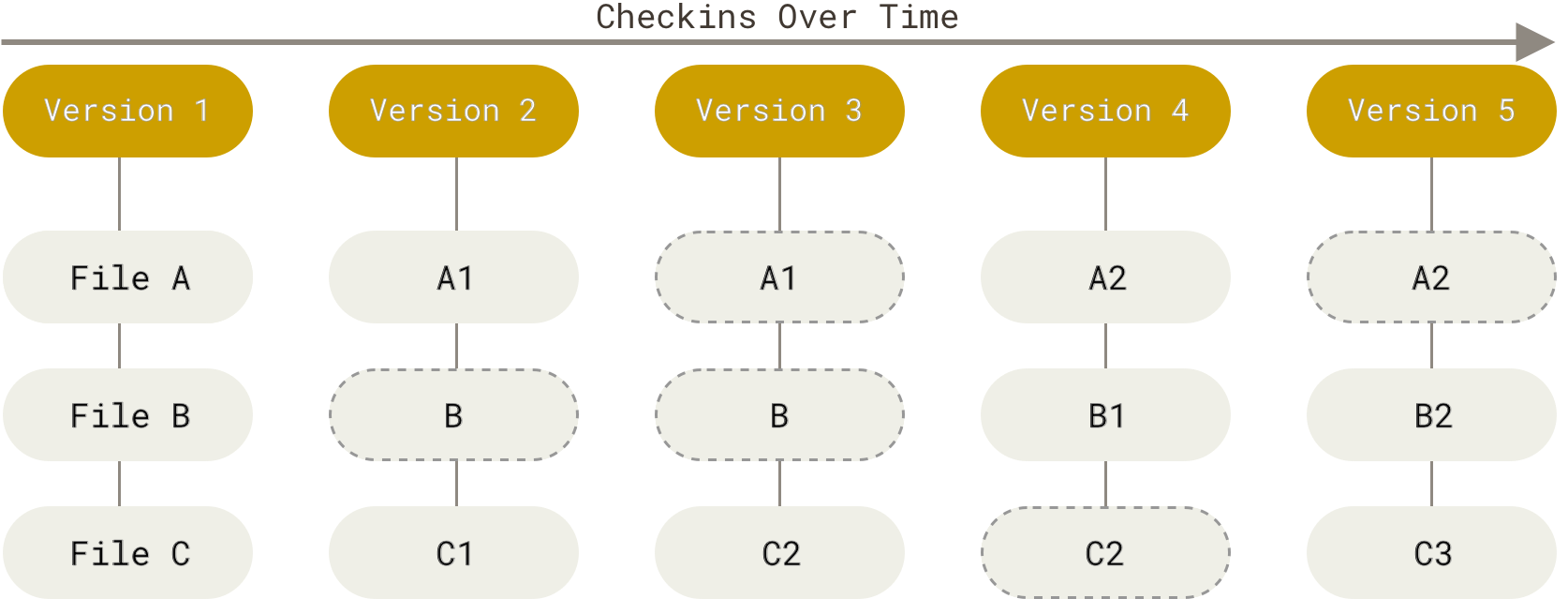
git takes a full snapshot of the repo at each commit.
Under the hood, it only makes a new copy of files that have changed because it uses the same technique to store each snapshot, so any files that have not changed, do not create new files inside of git.
A commit’s role is central to git
a commit is the basic unit of what git manages
All other git things are defined relative to commits
branches are pointers to commits that move
tags are pointers to commits that do not move
trees are how file path/organization information is stored for a commit
blobs are how files contents are stored when a commit is made
Parts of a commit
We will learn about the structure of a commit by inspecting it.
We can use git log to view past commits
git logcommit d1c1df80396c1eb7f395dad955f83f6dd995861e (HEAD -> organize)
Author: Sarah M Brown <brownsarahm@uri.edu>
Date: Tue Feb 10 12:46:03 2026 -0500
start organizing
commit 219c49c573315e67e15c080f0c03271bbb7a8cd2
Author: Sarah M Brown <brownsarahm@uri.edu>
Date: Thu Feb 5 13:15:06 2026 -0500
add title to readme
commit ba7a1e6b5fbd737d7ecb2cd54e32866121a476aa (origin/main, origin/HEAD, main)
Merge: f6886ba ce430e9
Author: Sarah Brown <brownsarahm@uri.edu>
Date: Thu Feb 5 19:58:25 2026 +0200
Merge pull request #6 from compsys-progtools/organizing_ac
Feb 5 in class activityhere we see some parts:
hash (the long alphanumeric string)
(if merge)
author
time stamp
message
but we know commits are supposed to represent some content and we have no information about that in this view
the hash is the unique identifier for the commit and the name of the file the commit is stored in in the object database (.git)
here we see some parts, go through the tabs to see each one highlighted
1 2 3 4 5commit d1c1df80396c1eb7f395dad955f83f6dd995861e (HEAD -> organize) Author: Sarah M Brown <brownsarahm@uri.edu> Date: Tue Feb 10 12:46:03 2026 -0500 start organizing
the hash is the unique identifier for the commit and the name of the file the commit is stored in in the object database (.git)
1 2 3 4 5commit d1c1df80396c1eb7f395dad955f83f6dd995861e (HEAD -> organize) Author: Sarah M Brown <brownsarahm@uri.edu> Date: Tue Feb 10 12:46:03 2026 -0500 start organizing
The author information generally has the display name and email address, these are set per system generally, but optionally per repository with git config
1 2 3 4 5commit d1c1df80396c1eb7f395dad955f83f6dd995861e (HEAD -> organize) Author: Sarah M Brown <brownsarahm@uri.edu> Date: Tue Feb 10 12:46:03 2026 -0500 start organizing
the time stamp shows the time the commit was made, including the time zone
1 2 3 4 5commit d1c1df80396c1eb7f395dad955f83f6dd995861e (HEAD -> organize) Author: Sarah M Brown <brownsarahm@uri.edu> Date: Tue Feb 10 12:46:03 2026 -0500 start organizing
the message is written for people to know what the contents of the commit is in human understandable terms.
we can view individual commits with git cat-file and at least 4
characters of the hash or enough to be unique. We will try 4 characters
and I will use the commit we inspected above, with full hash e899a0e7ad5a9626a6d5c6b0fd96a410bd42b710
git cat-file has different modes and one must be specified for it to work:
-pfor pretty print-tto return the type
We’ll use -p here:
git cat-file -p d1c1tree 2a11d8b533945e5e30709759c6ba009d9434c114
parent 219c49c573315e67e15c080f0c03271bbb7a8cd2
author Sarah M Brown <brownsarahm@uri.edu> 1770745563 -0500
committer Sarah M Brown <brownsarahm@uri.edu> 1770745563 -0500
start organizingNow we see more detail:
hash (used to access)
tree
parent
author with timestamp
commiter with timestamp
message
What is the PGP signature?
Signed commits are extra authentication that you are who you say you are.
The commits that are labeled with the verified tag on GitHub.com
Commits are implemented as files
commits are stored in the .git directory as files. git itself is a file system, or a way of storing information.
We noted before that there is a folder inside the repo that makes it a repo, the .git directory.
ls -a. CONTRIBUTING.md
.. docs
.git example.md
.github helper_functions.py
.gitignore important_classes.py
.secret LICENSE.md
about.md README.md
abstract_base_class.py scratch.ipynb
alternative_classes.py setup.py
API.md testsEverything the git program uses is stored in the .git directory, you can think of that like all of the variables the program would need if it ran all the time.
Let’s look inside it.
ls .git/COMMIT_EDITMSG hooks ORIG_HEAD
config index packed-refs
description info REBASE_HEAD
FETCH_HEAD logs refs
HEAD objectsMost of the content is in the objects folder, git objects are the items that get stores.
ls .git/objects/0c 2a 51 91 b0 d3 f3
16 2d 56 93 ba d8 f6
17 2f 63 9c be da f9
18 39 70 9d c1 e0 info
1e 3a 74 9e ce e2 pack
1f 3c 75 a2 cf f1
21 50 76 ab d1 f2We see a lot more folders here than we had commits. This is because there are three types of objects.
Each of those folders is the first 2 digits of at least one hash, or unique identifier for an object. We can list what is in one of those folders
ls .git/objects/d1/c1df80396c1eb7f395dad955f83f6dd995861eMine has just one, most will in a small repo like this, but it could be mroe than one.
We can look at the plain file using cat
cat .git/objects/d1/c1df80396c1eb7f395dad955f83f6dd995861ex??Aj?@
{?W?)????Jɽ??@+????fM??o?'?4000????a??h??0?,!??XT????\2g'???Zl?!??E?Ib? q??yP???M>Ɏ~?[????_???[_??<?|???f??ᄂ??o?????n??ޮ?-??vM???I?The content of the file is stored in binary.
git cat-file -p d1c1tree 2a11d8b533945e5e30709759c6ba009d9434c114
parent 219c49c573315e67e15c080f0c03271bbb7a8cd2
author Sarah M Brown <brownsarahm@uri.edu> 1770745563 -0500
committer Sarah M Brown <brownsarahm@uri.edu> 1770745563 -0500
start organizingthen we can see the object, mine is a commit, so I see the info like before.
Some of us picked an object that wa a tree or a blob instead.
To be able to read it we have to use the plumbing command.
git cat-file -p 2a11040000 tree 9d72a79362f262897aa70c626f582ad9111615fe .github
100644 blob c1b4f81358eaaf467ff4ce4b95171497c28d1622 .gitignore
100644 blob 3a4533a3abbc749f5e1905b30eb187a7350ae71a API.md
100644 blob 9ece5efa25710c8fad7d9f210928785b5362b06f CONTRIBUTING.md
100644 blob 2d232a2231c650dc4094606797fe0bd3e0ce4c65 LICENSE.md
100644 blob 174104846f6d51a714a5b9b5cab3ca0cc446d91b README.md
100644 blob 5639f2d42c61733765f3d23a71a3f72c87ec8a99 about.md
100644 blob 9d6ffa6ded47d8b6df13ed60e482b188015ee499 abstract_base_class.py
100644 blob 762f01b5cf84f39096d55ca95e46f0519d8cae48 alternative_classes.py
040000 tree 743db376fa76bb3611cfac6935938d179330c7eb docs
100644 blob 93c08483f44ebdf5ce10e6c0002e641aa0cc8844 example.md
100644 blob f9e70e5b8173525188a6b10ce5979972de4e0d9f helper_functions.py
100644 blob 762f01b5cf84f39096d55ca95e46f0519d8cae48 important_classes.py
100644 blob d87bf4a5641e0429fd3c371bd2b19d755105ca92 scratch.ipynb
100644 blob 39d5708913a6c708d1a505cde6da544785c086a6 setup.py
040000 tree d3980efccf4856f0c61a6a16ed40be534c5230a5 testsgit cat-file -p 743d100644 blob 1e97f0d64fc62f40bbeb0eba19fa696fe47b7ccc _config.yml
100644 blob e0f340c90f46a0103ee3dac9cfdc5520e4848731 _toc.yml
100644 blob 3c7ace1d193b78129c10d61609cbe97b2686f202 philosophy.mdgit cat-file -p 3a45jupyterbook file to generate api documentationcat .git/HEADref: refs/heads/organizegit log --pretty=onelined1c1df80396c1eb7f395dad955f83f6dd995861e (HEAD -> organize) start organizing
219c49c573315e67e15c080f0c03271bbb7a8cd2 add title to readme
ba7a1e6b5fbd737d7ecb2cd54e32866121a476aa (origin/main, origin/HEAD, main) Merge pull request #6 from compsys-progtools/organizing_ac
ce430e9745738c4b8818e2d527d303ca1b5d0f9e (origin/organizing_ac) add files for organizing activity
f6886babaa283a8238632930bf2cca9121fc274b (my_branch_checkedoutb, my_branch) Merge pull request #5 from compsys-progtools/2-create-an-about-file
cfd464dc22568fcff6aa302fbd6025e44b7262ac (origin/2-create-an-about-file, 2-create-an-about-file) Update about.md
a254c24301bc02c9624726573e902c8ffe437a0b create empty about
67010e313ae6a25d88b4d704769d1c46e6680d35 add online IDE url
3990d7285e7ec3390d9069fda3f37e2231f78664 Setting up GitHub Classroom Feedback
05b77103b9878a3b14fb0a2ca58bee76fdf56732 (origin/feedback) GitHub Classroom Feedback
9b61eadc429770d40b30f3a51af3ef69dc843e35 Initial commitls .git/refs/heads/2-create-an-about-file main my_branch_checkedoutb
fun_fact my_branch organizecat .git/refs/heads/organized1c1df80396c1eb7f395dad955f83f6dd995861eCommit messages are essential
A git commit message must exist and is always for people, but can also be for machines.
the conventional commits standard is a format of commits
if you use this, then you can use automated tools to generate a full change log when you release code
Fixing the README in gh inclass
today we will continue organizing the github inclass repo as our working example.
Codespaces are a virutal machine that you can use VSCode on in browser. You only have VSCode access to this system, but VSCode with the terminal is a lot of power.
cat README.md[](https://classroom.github.com/open-in-codespaces?assignment_repo_id=22432670)
# Readme
|file | contents |
> | --| -- |
> | abstract_base_class.py | core abstract classes for the project |
> | helper_functions.py | utitly funtions that are called by many classes |
> | important_classes.py | classes that inherit from the abc |
> | alternative_classes.py | classes that inherit from the abc |
> | LICENSE.md | the info on how the code can be reused|
> | CONTRIBUTING.md | instructions for how people can contribute to the project|
> | setup.py | file with function with instructions for pip |
> | test_abc.py | tests for constructors and methods in abstract_base_class.py|
> | tests_helpers.py | tests for constructors and methods in helper_functions.py|
> | tests_imp.py | tests for constructors and methods in important_classes.py|
> | tests_alt.py | tests for constructors and methods in alternative_classes.py|
> | API.md | jupyterbook file to generate api documentation |
> | _config.yml | jupyterbook config for documentation |
> | _toc.yml | jupyter book toc file for documentation |
> | philosophy.md | overview of how the code is organized for docs |
> | example.md | myst notebook example of using the code |
> | scratch.ipynb | jupyter notebook from dev |git pushfatal: The current branch organize has no upstream branch.
To push the current branch and set the remote as upstream, use
git push --set-upstream origin organize
To have this happen automatically for branches without a tracking
upstream, see 'push.autoSetupRemote' in 'git help config'.git push --set-upstream origin organizeEnumerating objects: 11, done.
Counting objects: 100% (11/11), done.
Delta compression using up to 16 threads
Compressing objects: 100% (8/8), done.
Writing objects: 100% (9/9), 1.46 KiB | 1.46 MiB/s, done.
Total 9 (delta 3), reused 0 (delta 0), pack-reused 0 (from 0)
remote: Resolving deltas: 100% (3/3), completed with 1 local object.
remote:
remote: Create a pull request for 'organize' on GitHub by visiting:
remote: https://github.com/compsys-progtools/gh-inclass-sp26-brownsarahm/pull/new/organize
remote:
To https://github.com/compsys-progtools/gh-inclass-sp26-brownsarahm.git
* [new branch] organize -> organize
branch 'organize' set up to track 'origin/organize'.gh repo view --webOpening https://github.com/compsys-progtools/gh-inclass-sp26-brownsarahm in your browser.today we will also work in github codespaces.
Navigate to your github inclass repo on Github.com
Use the link in the README or the green code button to open a new codespace on main.
when your codespace is open, share its name (first part of the url 2 words)
you need to commit changes
codespace is linux
this is why i teach bash
as developers, we will all interact with linux/unix at times, so bash is the best shell to know if you only know one or do not want to switch between multiple
Multiple cursors are your friend
Let’s use multiple cursors to remove the unnecssary > in our READMEs
Prepare for Next Class
Think through and make some notes about what you have learned about design (software or otherwise) so far. Try to answer the questions below in
design_before.md. If you do not now know how to answer any of the questions, write in what questions you have.
- What past experiences with making decisions about design of software do you have?
- what experiences studying design do you have?
- What processes, decisions, and practices come to mind when you think about designing software?
- From your experiences as a user, how you would describe the design of command line tools vs other GUI based tools?Badges
Review the notes from today
Export your git log for your KWL main branch to a file called gitlog.txt and commit that as exported to the branch for this issue. note that you will need to work between two branchse to make this happen. Append a blank line,
## Commands, and another blank line to the file, then the command history used for this exercise to the end of the file.In commit-def.md compare two of the four ways we described a commit today in class. How do the two descriptions differ? How does defining it in different ways help add up to improve your understanding?
Find the detailed view of the commit that added today’s notes to the website in github.com and locally. In
commit-detail.mdinclude the url to the commit in github and the contents of the commit object with some notes on any differences (if any).
Review the notes from today
Explore the tools for conventional commits and then pick one to try out. Work on the branch for this badge and use one of the tools that helps making conventional commits (eg in VSCode or a CLI for it)for a series of commits adding “features” and “bug fixes” telling the story of a code project in a file called commit-story.md. For each edit, add short phrases like ‘new feature 1’, or ‘next bug fix’ to the
commit-story.mdeach time, but use conventional commits for each commit. In total, make at least 5 different types of changes (types per conventional commits standard) including 2 breaking changes and at least 10 total commits to the file.learn about options for how git can display commit history. Try out a few different options. Choose two, write them both to a file, gitlog-compare.md. Using a text editor, wrap each log with three backticks to make them “code blocks” and then add text to the file describing a use case where that format in particular would be helpful. do this after the above so that your git log examples include your conventional commits
Find the detailed view of the commit that added today’s notes to the website in github.com and locally. In
commit-detail-compare.mdinclude the url to the commit in github and the contents of the commit object with a description (pseudocode or bullets) of what Github would have to do to create its detailed view page from the commit object.
Experience Report Evidence
Questions After Today’s Class
What are other little tricks I can use on VScode to make my experience better?
We will learn more about this later! Great question!
One question I have why when I use git cat-file -p <commit hash> for example my most recent commit was lp4f, when I run the command it still says the object lp4f does not exist?
Hmmm... are you sure those are the first four? If so, try a different a diffent commit and see if the same thing happens. Also, let’s talk next class.
Can I press tab as well for the numbers or no?
You cannot tab complete for the hashes.
How do I properly back track and relearn the material, especially since I missed and still haven’t done last thursday?
Read through the notes on this website!
how often will we use codespace in this class?
Not too often, but it is another tool that you can use as needed.
Is it better to use local vs code vs codespaces?
In many ways, they are equivalent. Codespace is a paid service with limited free use. You have already paid for your laptop.
How does git store the files from different commits efficiently in order to allow swapping between branches?
The commit files we saw today are how the files are stored. When we switch branches, it uses the content and updates the local filesystem.
What other types of commit standards are there?
This is a great explore badge idea!